AccessAlly: Top Features and Benefits

AccessAlly: Top Features and Benefits

A few years back I made the choice to move the Monkeypod members area onto AccessAlly, and I wrote this blog post documenting why we made that decision.

But recently my new business partner Cameron was asking about the role it plays for us, and so i took the time to spell out some of the top benefits. Here they are:

The short update is AccessAlly has been a great fit – I still love it, both the company and the software. If you are looking for a Membership plugin for your WordPress site, I’m more than happy to endorse AccessAlly.

What does AccessAlly do?

The core benefits it offers for Monkeypod are:

  1. Course Access: While many of the Monkeypod courses are now on the Keap Academy platform, we still offer free mini courses through our members area, and are in production of new flagship courses for later this year.
  2. Member Access: Monkeypod’s core offering is the OG Membership – and whlle our private community is hosted in a Facebook group, there are other member benefits that are housed in our AccessAlly members area.
  3. Affiliate Center: If you use Keap’s affiliate features, it does have a native referral partner center that you can use, but I didn’t want my partners to have to log in one place for their links and another for the rest of Monkeypod’s content, so I use AccessAlly’s platform to house my partner resources.
  4. Customer Billing Center: Because the AccessAlly members area is behind a login, this means members can securely view their past invoices, update their card on file, and make payments if they have an outstanding balance. This is good because, well, money – but also it reduces the manual effort in tracking down payments that are overdue, or helping customers with general billing questions.

This isn’t a comprehensive list of AccessAlly features, or even all the features I’m currently using, but these definitely are some of the most valuable aspects components for the role it plays for Monkeypod.

AccessAlly Features and Benefits

AccessAlly is a WordPress plugin – so if you use WordPress, this would add the membership style functionality to your site. In addition to the page permissions, some AccessAlly editions includes learning management style tools (progress tracking, certificates, etc).

So, if launching a membership site has been on your to-do list, you can check out the AccessAlly editions and pricing here.

And, if you want to see the inside of the Monkeypod members area – you can sign up for one of the free mini courses here, or join the OG membership.

If you have questions or comments, drop them below. Thanks for reading.

Ask the Experts

Memberships can be a powerful way to grow a business, or enrich the way you serve your audience. This course features important questions and valuable insights from a variety of experts with experience building and growing membership model businesses.

Introducing Keap Pay

Introducing Keap Pay

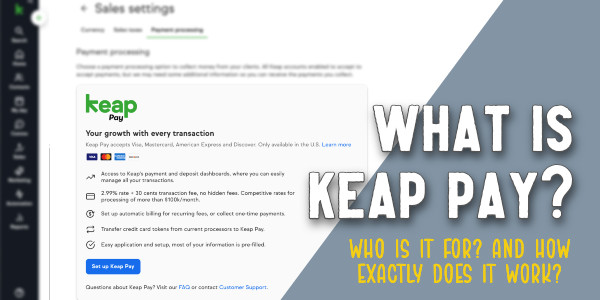
Keap Pay: Your New Payment BFF for Small Business Success?

A simple rule for business is “Make it easy for your customers to give you money.”

That’s where Keap Pay swoops in like a caped hero, ready to make life a whole lot easier. In this post, we’ll break down what Keap Pay is, how it works, and help you decide if it’s a fit for your business.

What Exactly is Keap Pay?

Keap Pay is a payment processing solution tailored just for small businesses (currently available for US based businesses).

It’s all about simplifying your payment processing, reducing transaction costs, and boosting your overall efficiency.

Features of note:

  1. Payment Variety: Keap Pay lets you accept all kinds of payments, from credit cards to PayPal (with plans to add Apple Pay). It’s like giving your customers a buffet of payment options.
  2. Invoicing Made Easy: With Keap Pay, you can create and send invoices right from the platform. No more chasing payments—your customers can pay online, making your life a whole lot simpler.
  3. Set It and Forget It: Got subscription-based services? Keap Pay’s got your back with recurring payments. Set it up once, and you’re good to go, saving you time and hassle.
  4. Keap CRM Integration: Keap Pay plays nice with Keap’s CRM software (obviously), meaning you can manage contacts and payments all in one place.
  5. Reliable Security: Keap Pay takes security seriously, using top-notch encryption to protect your payment info. Rest easy knowing your transactions are safe and sound.

To better understand the ins and outs of Keap Pay, Cameron sat down with Danny Diede (Product Manager at Keap) to get the inside scoop:

So, is Keap Pay superior? Should I switch?

If you’ve been using WePay, then yes, time to switch because WePay is closing.

But more broadly, here are some of the specific ways that Keap pay might make things easier for you and your customers:

  1. Efficiency Boost: Keap Pay streamlines your payment processes, saving you time and energy. Features like online invoicing and recurring payments take the hassle out of getting paid.
  2. Cost-Effective: Say goodbye to sky-high transaction rates. Keap Pay offers competitive pricing, helping you save big bucks on payment processing.
  3. Cash Flow Confidence: Faster payment processing means smoother cash flow for your biz. No more worrying about gaps in your cash flow—Keap Pay keeps things flowing smoothly.
  4. Happy Customers, Happy Biz: By offering multiple payment options and seamless payment processes, you’ll give your customers a top-notch experience. Happy customers = repeat business.

Wrapping It Up

Keap Pay is a competitive option for small businesses looking to simplify their payment processes and boost efficiency. If it sounds like a fit you can sign up for Keap Pay today, currently available for all US based Keap users.

I think I need training…

The Keap Academy platform features two detailed courses covering the ins and outs of using the sales and e-commerce features available in your Keap account.

There’s one course for Keap pro and max, and another for Ultimate or Max Classic (formerly Infusionsoft).

The Power of Showing Up

The Power of Showing Up

Recently I had the absolute pleasure of assisting the Keap Academy team as they hosted an intensive workshop. Keap users from near and far made the investment to show up for 2 full days of in-person, hands-on app and strategy training. As a Keap Certified Partner, they welcomed my presence so that that the attendee/teacher ratio was as low as possible. This was amazing, as many attendees got a lot of one-on-one face time with trainers and experts as they strategized and implemented.

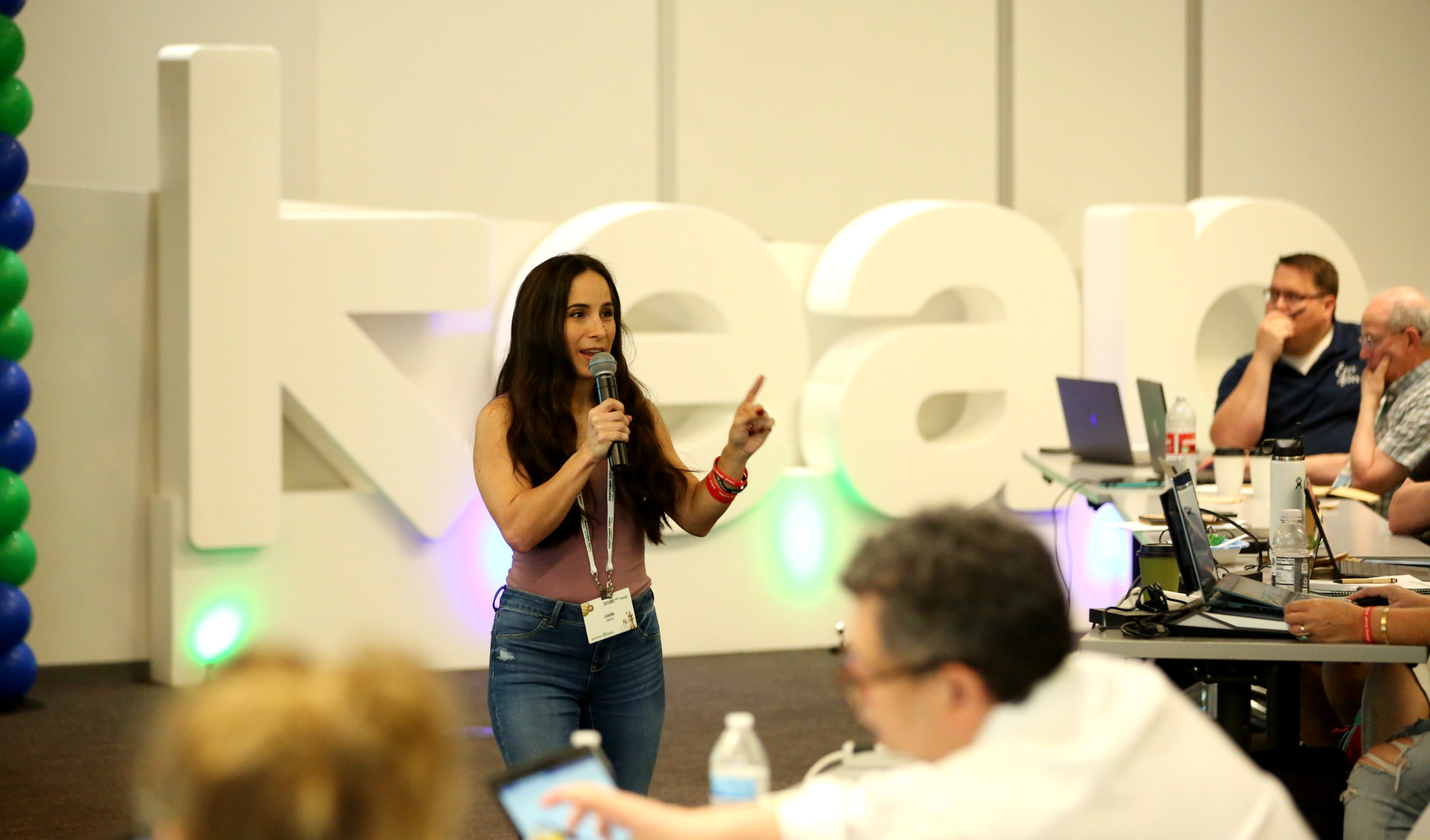
Jade teaching at Automation Lab

As “normal” as this event was, to be honest I am still blown away weeks later. I often feel a rush of awe and appreciation after in-person events, but there’s more to it than that. I want to unpack and articulate why I constantly feel that way, and to turn it into a learning moment for us all.

Before I dive in, I want to be clear that I can prove there is a lesson and ROI after all. At the risk of sounding self-deprecating, as an automation consultant I can sometimes be the cobbler with no shoes. I often spend more energy on my clients´ businesses than my own (sound familiar?).

And yet, I find my consultancy to be booming despite not having put together many systems in place for myself. After a couple years of beating myself up over a lack of strategy, I realized I had accidentally been employing a strategy all along — this “show up” strategy.

When in a room full of Keap users, it never ceases to amaze me how varied and eclectic peoples´ strengths and expertises are. Some people are more creative than techie, some are both or neither. When it comes to the app itself, it is equally as fascinating to learn how people’s brains can easily or not-so-easily grasp the automation concepts and execution. I have met business owners with no formal education who can build complex automation systems, and I have met highly educated professionals who require extra time to learn the basics. This recent Keap Academy event was no different.

Jade and Walt

But you know what they all had in common? They showed up. Newbies and veterans sat side-by-side to learn and build automation.

Here’s the kicker, though. The real value they all received at that event had, in my opinion, nothing to do with software. It was the cumulative energy and ideas they got from just being there alongside their peers. They could have watched some of the excellent Keap Academy courses or subscribed to the Monkeypod YouTube Channel, and they would have learned a lot (I still do).

But a limitation there is that they’d be learning from a single perspective, no matter how knowledgeable that perspective might be. The beauty and opportunity lies in the diversity of knowledge, experiences, and expertise combined. (Another example of the whole being greater than the sum of its parts, I think.)

addison automation lab

You see, the blessing and curse of automation and technology is that there are so many ways to skin the cat. Even the simplest of tactics could take shape in dozens of ways. For example, something as straightforward as “landing page collects contact info and then delivers a free pdf lead magnet via email” has so many variations that we couldn’t possibly say “just build it like this” and it would work for everyone perfectly.

To some, this is a challenge, for others – like the kind of people who “show up” – it is an opportunity.

Here lies the lesson: You’ll never know what other possibilities are out there unless you mingle with people who have tried it other ways.

None of us know our own blind spots – that’s kind of the definition of a blind spot.

As I write this today is my 5 year anniversary of joining Monkeypod Marketingˋs OG Membership. Many of you know me as the Community Manager there, but before that I was a paying member.

This is just as true today as it was 5 years ago: I get more value from other people’s questions and ideas than from any question or idea I could have thought to ask. It’s not what you know, it’s what you don’t know.. yet.

Maybe more to the point, it’s WHO you know. If I didn’t invest in myself to have the privilege of sharing space with other creative and smart entrepreneurs and experts, I wouldn’t know half of the cool strategies and tricks that I do.

When I signed up, my company wouldn’t cover it so I paid for it out of pocket – I didn’t know what I’d learn, I just knew I was hungry to be around the people from whom I COULD learn.

sarah watz at automation lab

Even when it comes to tactics and best practices that are too advanced for me or even out of my wheelhouse altogether, I enjoy being around the people who can do the things that I can’t. I surely will need those people eventually.

My partner Brian, a serial entrepreneur, often says that you’re the average of the people you spend time with. What I took from this was to find as many rooms as I could where I was the dumbest one there.

Admittedly, that’s hyperbole. But the lesson is to make sure you’re surrounded by people who know things you don’t – it will naturally start to illuminate and eradicate your blind spots.

jade teaching in theater

So I find them, and I show up, again and again. If you’re searching for a more specific action item, then I challenge you to come to the Let’s Grow Summit, and any and all other events you can swing. Better yet, come find me there so we can hang out and share ideas.

Those Keap Academy event attendees likely think they were fortunate that I was there to share ideas and teach app implementation. But I assure you, I got the better end of the deal.


Evergreen Customer Journey [inside Keap]

Evergreen Customer Journey [inside Keap]

For a few years now we’ve been building the Keap Academy platform and filling it with free and valuable content for Keap users

And recently we crossed 25k enrollments, which is a meaningful milestone for our little team.

So we’re doing a decent job helping people find and access the content we produce, but one improvement we’ve wanted to make is creating an automated process that starts when someone finishes a course and recommends a logical next course to keep the momentum going.

The challenge is that we needed this recommendation process to take into account variables like what courses they have or haven’t already done and what version of Keap they have.

So here’s what we came up with:

This automation is designed for us to help the Keap Academy contacts continue their learning with our free resources, and build momentum that helps their business.

But this same approach could be used in myriad business scenarios where you have multiple products you offer, or competing CTAs; or any other scenario where you have a body of people with different needs to want to be able to help support as they make progress.

Alright – there you have it.

This automation is a micro example of an intentional and evergreen journey.

It starts when someone completes a course (or stalls out in one), and it stops when they start a new course. We’ve currently set it up so that the invites are only sent once, but conceivable we could design a V2 of this campaign with a new branch for repeat visitors that recommends the same set up courses using different language, or makes a completely different set of recommendations.

Where do I learn more?

Keap Academy offers a course all about journey design – Lifecycle Automation. If you’re interested in adding structure and predictability to the experience your leads and customers have, this is for you.

Email Engagement Tracking [inside Keap]

Email Engagement Tracking [inside Keap]

You’ve likely heard about the way Google, Yahoo, and Outlook are evolving, but one aspect if that is the rising importance of engagement.

It’s no longer enough to get email permission once – we need to be maintaining our list, and actively removing the contacts who stop engaging.

If you depend on email as part of your business strategy, either to produce sales, serve your customers, or for any other business function; then this is a critical habit to adopt – and soon.

So, how do we report on engagement?

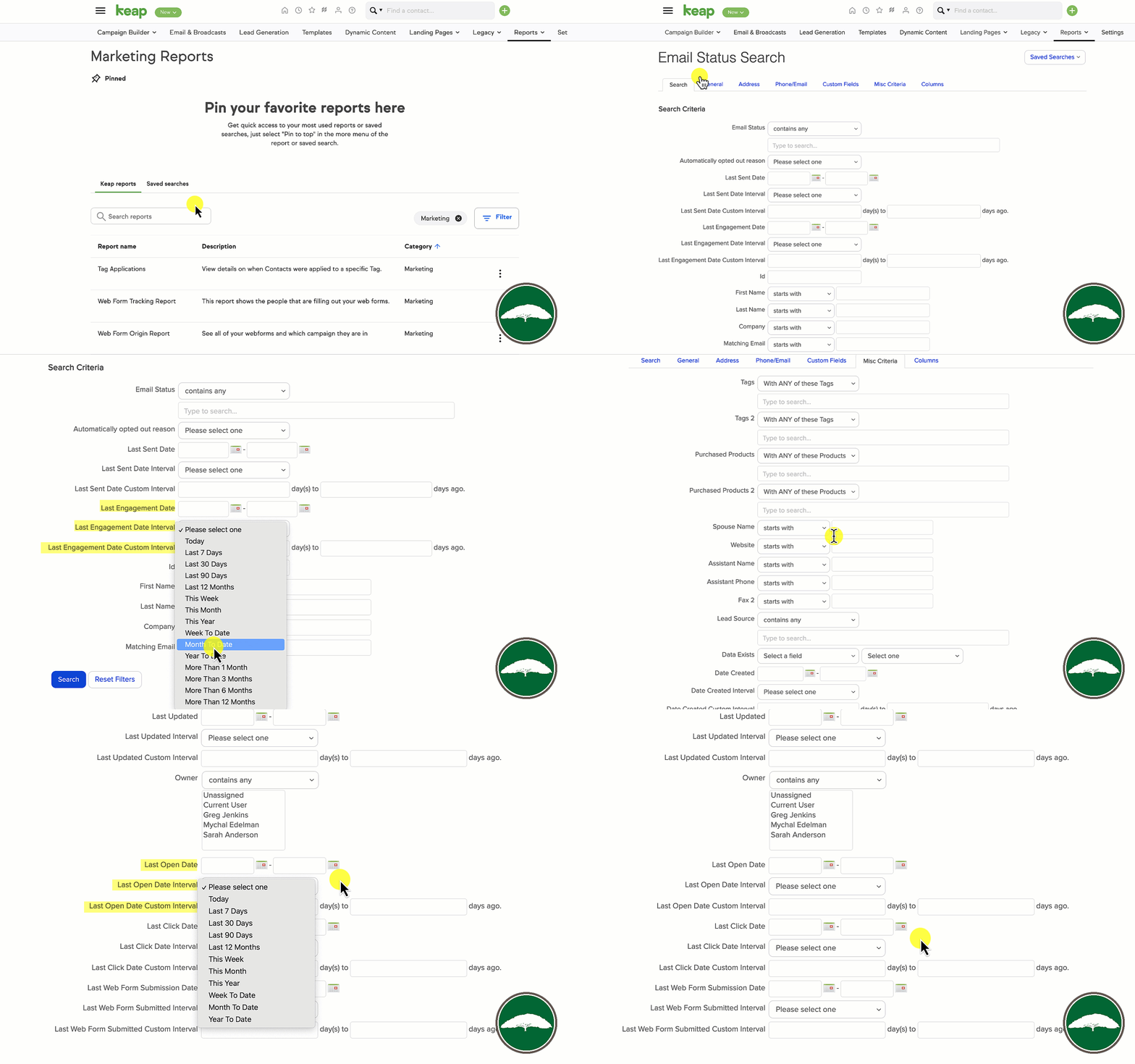
Inside of Keap there is a report you can use to manually search for contacts who have (or haven’t) engaged in various time frames.

In Keap Ultimate, formerly Max Classic, the report is called the Email Status Search.

In Keap Pro and Max it’s called the Email Engagement Tracker.

But in both versions it has a set of useful filters you can use to assess your database.

Keap Email Status Search

So that sneaky little report might just give you all the information you need.

But running it manually can be a little labor intensive…

Can I automate this?

So thankfully, the answer is yes.

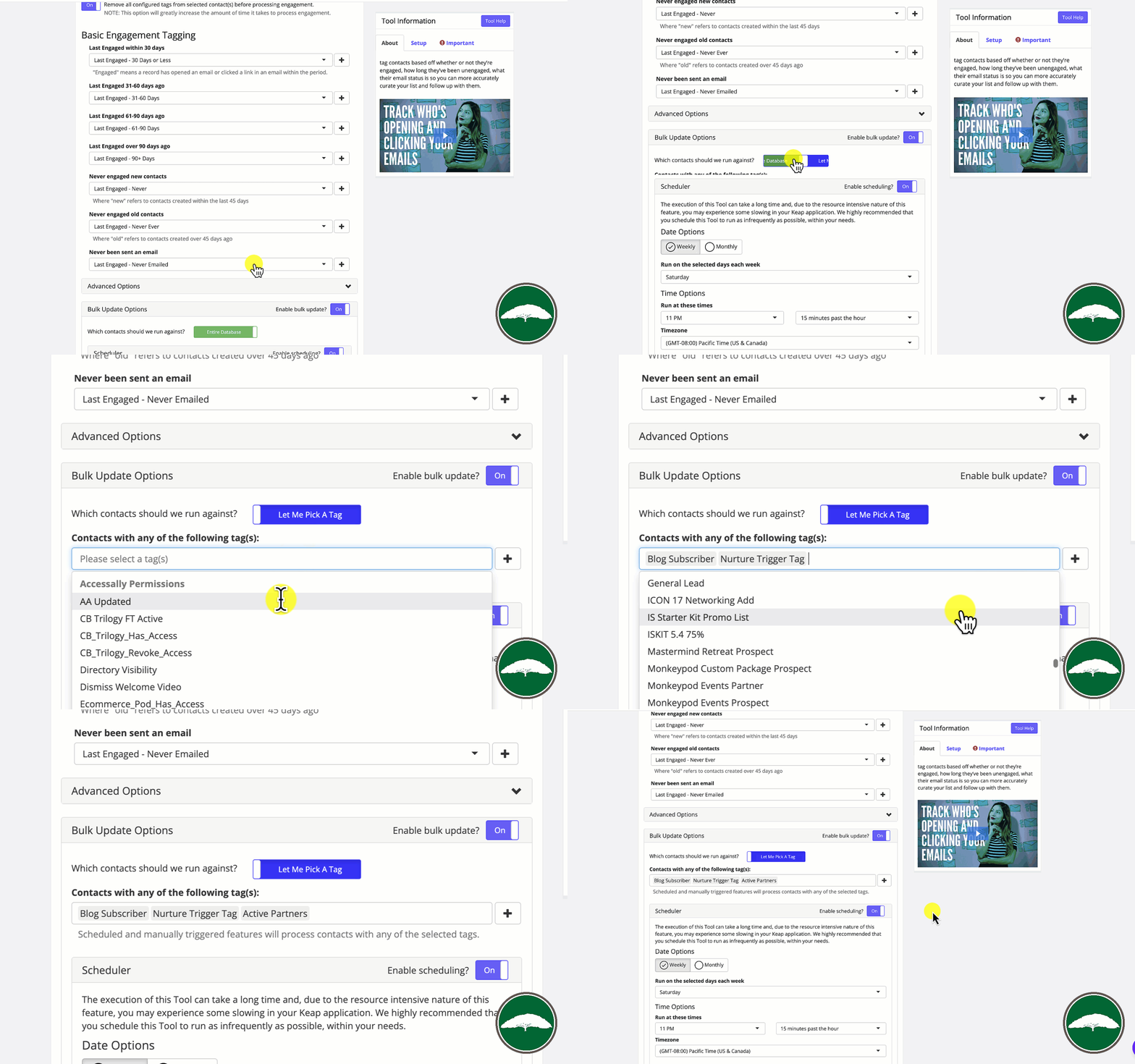
PlusThis has a feature called Email Engagement Triggers that allows you to process the contacts in your database on a recurring schedule, and automatically update their tags to reflect their most recent engagement.

Now, one thing to note is that this checks contacts individually – so it does count as a tool run per contact. If you have unlimited tool runs, no problem. But if you don’t then you might want to look at restricting the audience it runs against using the selector option.

Engagement Tracker Settings

Or, you could also use the HTTP post option and run it against contacts as they hit key steps in your automations.

Moving on – a common question I’ve been getting is “How does this differ from Keap’s native tools…”

Is this better than Keap’s native engagement tracking?

Good question. The PlusThis feature is different from the native tools in a few key ways.

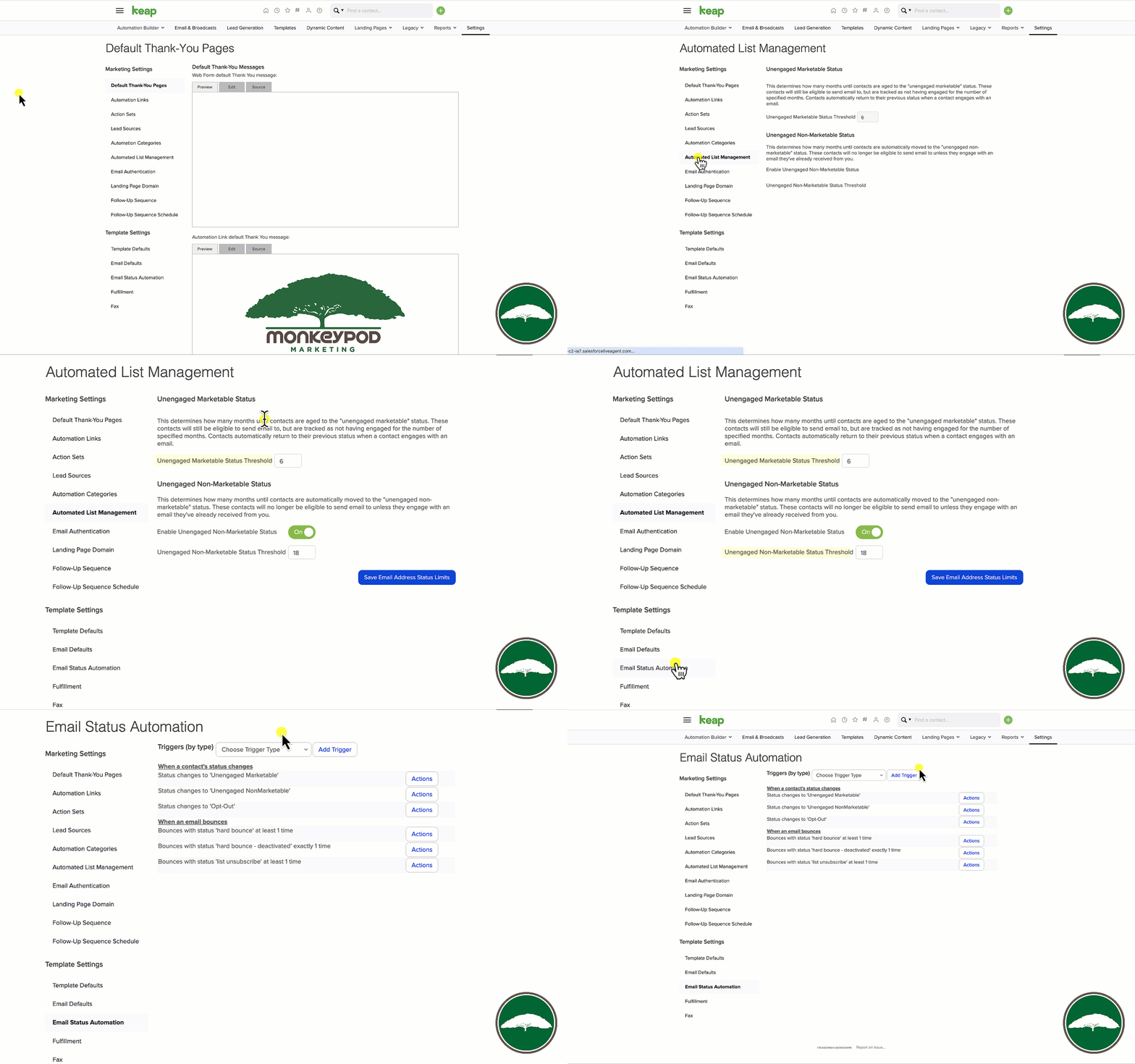
First – it’s much more granular. Keap lets you automate when someone’s email status changes, or change their status when their engagement slips (unengaged marketable, and unengaged nonmarketable).

Native Keap Engagement Features

PlusThis lets you tag contacts when their engagement hits key threshholds. So, if they don’t engage for 31 days, it tags them, then again at 61, or 91, etc.

But, the other way this differs is that it runs on a schedule you can choose, and then it resets the tags. So, if someone re-engages, it’ll automatically remove the unengaged tags as it re-evaluates your database.

Alright – there you have it.

At the very least you can start analyzing your database to segment based off of engagement with the native reports, or if you’re already a PlusThis user you can quickly set up the Email Engagement Triggers and you’ll immediately have new information you can use to improve targeting and segmentation.

Or, if you’re not yet a PlusThis user – check out the plans and start a free trial here.

Where do I learn more?

The Keap Academy platform offers a course covering ways to Supercharge Your Automations using PlusThis, featuring real world examples and use cases from Keap Partners and PlusThis users.

Automatic Stage Moves inside Keap

Automatic Stage Moves inside Keap

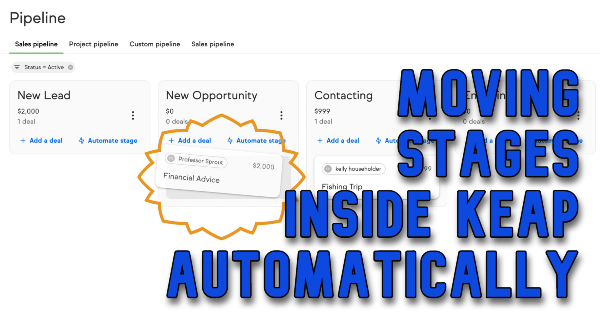
The pipeline inside Keap is a powerful tool for tracking any process. The most common use case for Keap’s pipeline is for tracking deals or opportunities in your sales process.

Generally speaking, you’d create an opportunity once a lead has expressed interest, and then you or your sales team would advance that opportunity through a set of stages as those prospects turn into customers. Here’s an overview of the pipeline for anyone who wants a refresher.

And most of the time we want this process to be manual – because we want to move the deal once we’ve interacted with them, and are ready to begin the next part of the process.

But not always.

Can I move stages automatically?

There are times where you might want to automatically advance an opportunity between stages, and yes, you can do it automatically.

So, if a prospects signs some paperwork you might move them out of the ‘signing’ stage and into the ‘closing’ stage.

Or, if they pay a quote you sent them, you might want to automatically move them from ‘quoting’ to ‘won’.

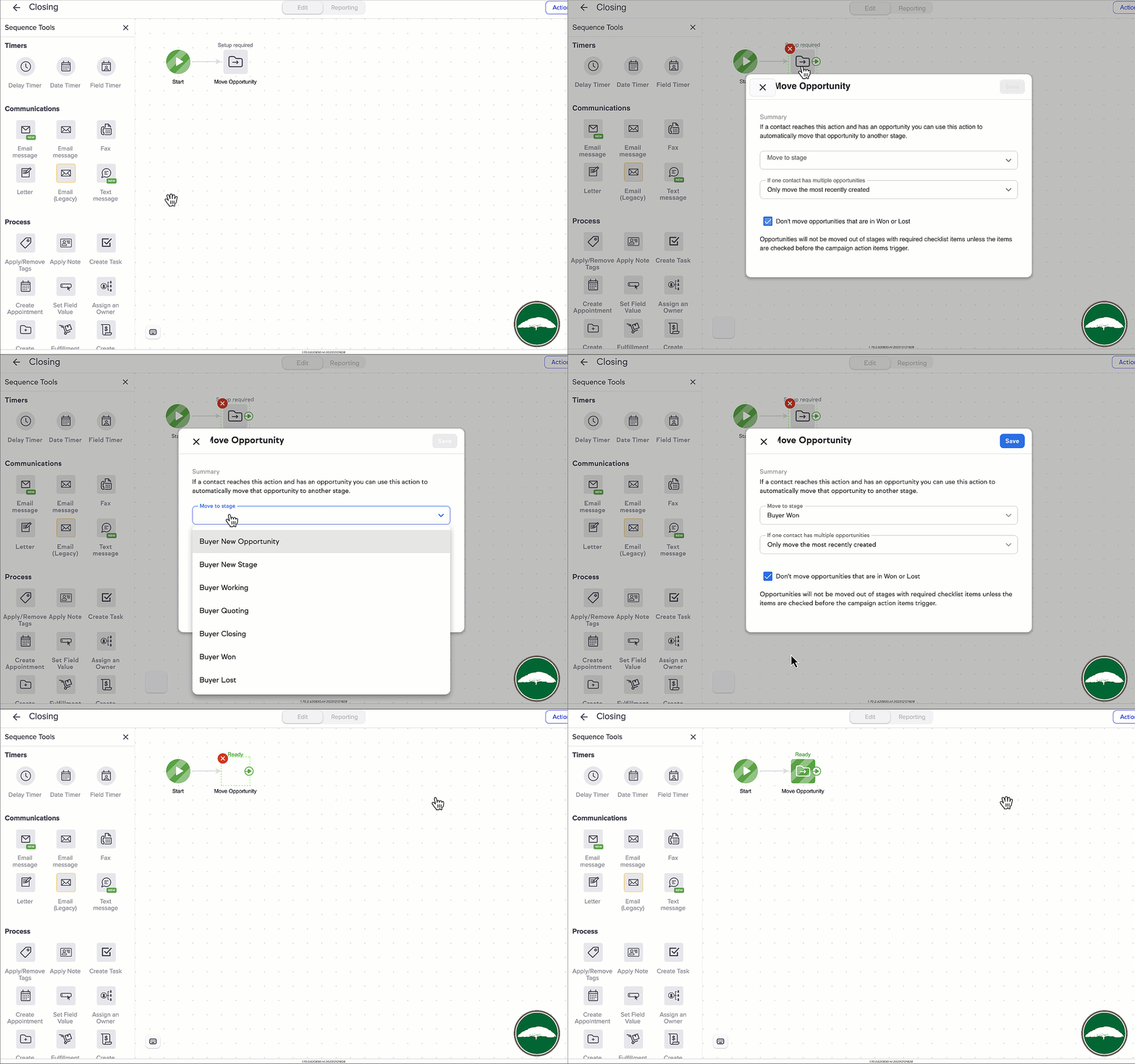
And inside Keap Ultimate (formerly called Max Classic, and before that Infusionsoft), you can move a opportunity automatically as a step inside your sequences in the campaign builder.

move a deal automatically gif

So, if you’re a Keap Ultimate user, then you’re all set. This will give you what you need.

But what about Keap Pro and Max?

In Pro and Max things work a little differently right now.

For starters, Opportunities are called “Deals” – the concept is the same, but the terminology is a little different.

And at this point there isn’t a step in Advanced Automations to automatically move a deal between stages, but it is still possible.

Here’s the workaround:

Okay, so – let’s summarize.

Ultimate (previously Max Classic) lets you move opportunities automatically as a step in the campaign builder.

Pro and Max will let you move Deals as a step in the Easy Automations builder.

So, regardless of which version of Keap you have, you should have a solution that works for you.

If you’d like to learn more about using Keap’s pipeline features check out these free courses in the Keap Academy platform.