Keap, Software Updates
Infusionsoft keeps the momentum going with another strong update (scheduled to release over the next week). Lots of goodies in this update; some that we’ve been waiting for, and some that I didn’t even know I wanted. I’m gonna profile a few of the new features to let you know which ones I’m most excited about and why:
Update #1: New Email Builder in Campaigns
What it does: This gives you the ability to use the new Email Builder inside the campaign builder.
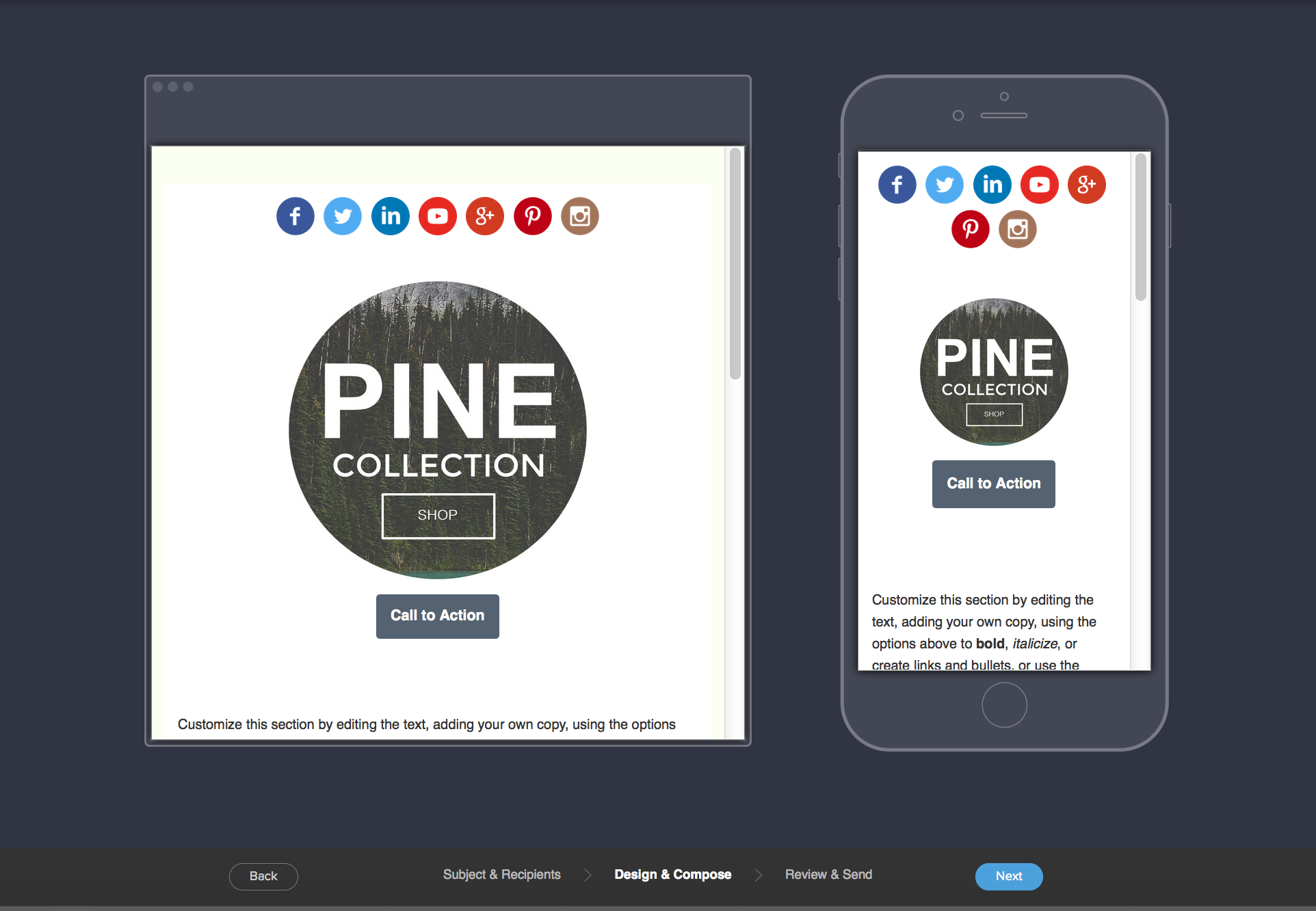
Why it matters: Um, because its amazing. Now you can send mobile responsive emails in your campaigns. It’s freaking here. (Maybe a little late, but it’s here, okay?) You just drag out the Email Beta snippet like you normally would when building an email inside a sequence, but this time when you go to configure it, it’ll open the new builder environment instead of the traditional one.
(Oh yeah, and templates. We can now create, save, and use our own templates for the new email builder. Yahtzee!)
 Update #2: New Unengaged Marketable Email Status
What it does: This release introduces a new email status to tell you which of your marketable contacts have disengaged for 4 or more months.
Why it matters: This allows you to see how effective your marketing is doing, and target segments of your list with waning engagement levels. I think most people will agree that marketing to contacts who are interested in what you have to say will definitely yield better results than marketing to folks who have totally tuned you out. At the very least, this will allow you to differentiate so you can speak to those two groups differently. Oh, and they’ve added the ability to filter and search by this criteria via the Email Status Search.
Update #3: New Quote Status Filters
What it does: This gives you some additional filters by which you can search your quotes.
Why it matters: Did you know Infusionsoft has the ability to send quotes? Well, it does. And it is rapidly getting better. A few months ago they gave us the ability to accept payment on those quotes; and now they’re adding some new filters to the quote reporting so that you can find the data you need regarding your outstanding quotes. If you’re using quotes (I’m looking at you Delane) then this is great news.
Update #4: Auto-Update Credit Card (For Infusionsoft Payments)
What it does: This new feature means that when a customer receives a new credit card, the system will automatically start billing the new card and stop trying to bill the one that was expired or cancelled.
Why it matters: I don’t think I need to explain….but really, this means you that Infusionsoft will communicate directly with the credit card issuer to gather and bill the new credit card details rather than having you reach out to your customers to try and get the new details or trying to get them to update their info. NOTE: This is only available for people using Infusionsoft Payments, and only for MasterCard and Visa. But still, this is amazing. No more need for billing automation to collect for those folks. It doesn’t hurt to have them update it manually, but now that’s the fallback instead of the standard.
There are a handful of features in this release, so I’m not going to profile all of them. In fact, I’m not even going to record a video outlining the new updates because Infusionsoft has already created this video; and it’s freaking awesome (Kudos Brett). Enjoy:
Keap, Small Business
Bad Joke Warning: There are two types of Infusionsoft users – People who admit that their app is a mess; and people who lie about it.
Maybe that’s hyperbole, but it really seems like every person I talk with acknowledges that they could use a little tidying up (no matter how many systems they’ve subscribed to). In fact, one of my 3 most successful lead captures is my 21 Point App Audit Checklist. 82 people downloaded this checklist in January. Now, that’s a number that’s not exactly staggering, but it does tell me that there are plenty of people wondering how they can do a better job organizing their account.
(Also, regarding the title of this post; Yes, I know it’s not Spring everywhere. But let’s let it slide this time, Australia.)
Here are 5 of the 21 tips that you can do today to start cleaning up your app:
- Check your Can-Spam address block. This information is added to the footer of all emails, it’s something people often set up and then forget to go back and update it if they change addresses. (Read more)
- Identify Duplicate Contact Records. There are a number of ways for duplicate records to accumulate in your application, it’s important to check for and address duplicates periodically. (Read more)
- Delete Erroneous Saved Searches and Reports. Oh man, this is an easy one to overlook, and then ka-blamm
 o, next thing you know you’ve got 60 saved searches to sort through before you can find anything. If you aren’t using a report, or it’s become obsolete; just take the time to delete it so it isn’t causing confusion.
- Audit Your Dashboard. If your dashboard loads every single time you log in, then you should be asking yourself if every statistic or report on your dashboard is necessary. Your dashboard is valuable real estate; make sure you’re only using it for information that you need every time you log in.
- Clean-up and Rename Files and Images. This is another one that many people don’t know they can do. Ya know how you can upload images directly into an email or into a web form? Of course you do. Well, most people don’t have the foresight to give it a name that will make sense to them in 6 months or a year. So, without even trying they end up with a whole list of images with names like screenshot3_14_16.jpg and headshot_final_v3.png. (Time to rename your images.)
So, these 5 tips, and the other 16 in this Ebook are all things that you can do to tidy up your application and make your life a little easier.
Oh, and because doing things manually is a pain, here’s a brief video profiling a campaign you can build to let your prospects and customers help you with your spring cleaning:
Keap
The other day I blogged about the product updates announced at ICON this year; but I didn’t share my perspective on the rest of the conference. So, I want to do that here.
ICON is amazing. And you should definitely plan on coming next year. But just so you know I’m not a homer: Let me start by giving Infusionsoft some tough love. They did a lot of things right with this conference (as they always do), but in my opinion, they got a few things wrong this year. Things that I just found were…a little “meh“.
Before I get into those, I want to be abundantly clear that these are just my opinions. I also recognize that being in the space that I’m in, and being a former employee, it’s entirely possible that I perceive things differently than most. And it could just be that ICON is not for me, and that’s fine too.
 Meh #1: What was up with the schedule?
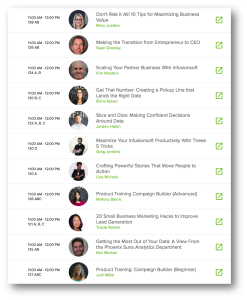
In my opinion, there were far too many breakout sessions. I mean, I’m okay with giving people options, of course, but during slot that I presented, there were 11 other speakers simultaneously competing for the same audience. The room I presented in had 800 chairs set up. There were at most 4000 attendees. I’m no mathologist, but something doesn’t add up there. Initially I thought they had done this to provide an immense amount of content and if people felt like they missed out, then they’d just be able to buy the video library, but that wasn’t the case (more on that later).
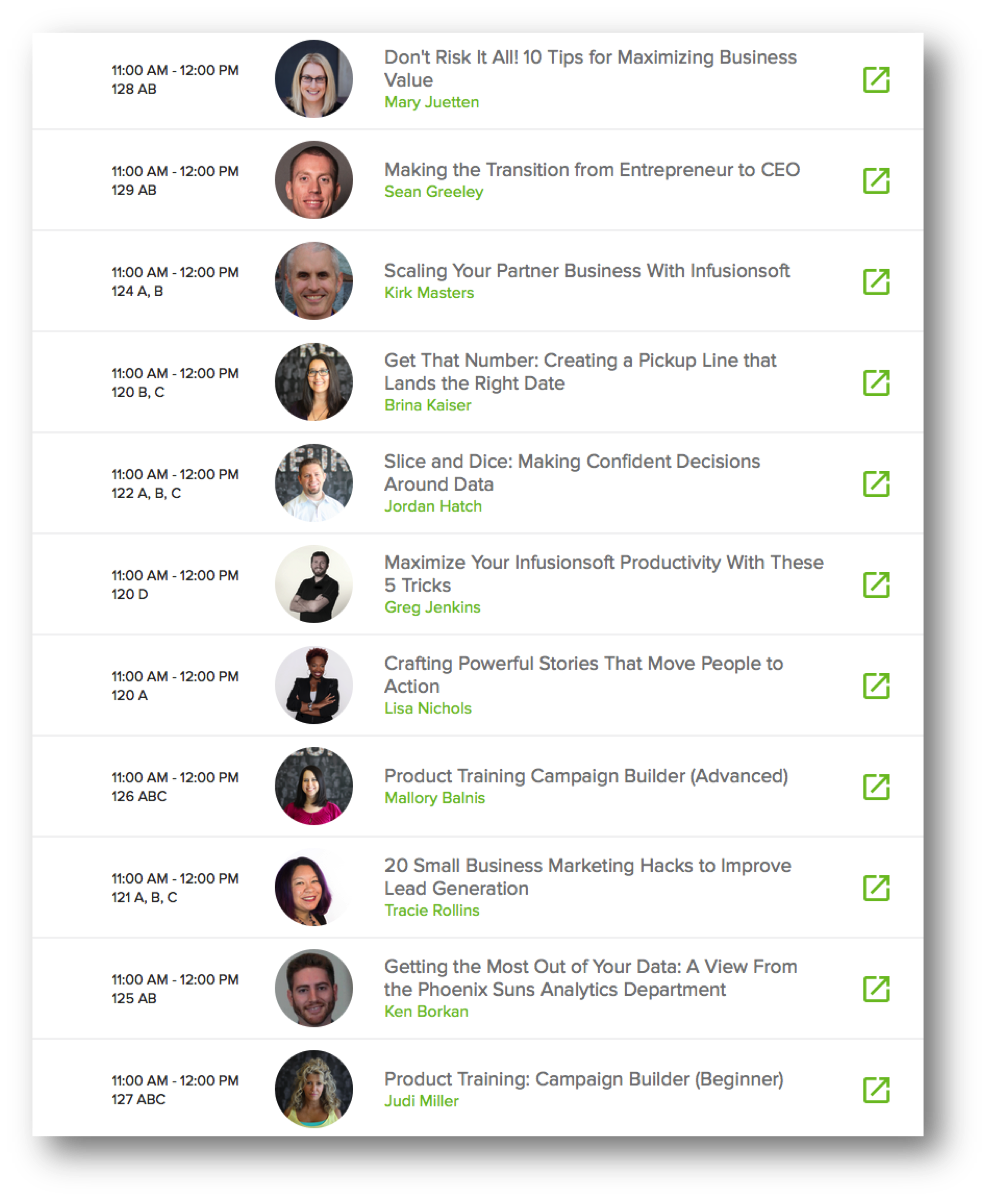
Also, if there was logic to who was presenting when (outside of the Sixth Division breakout block), I couldn’t find it. There didn’t seem to be a rhyme or reason to the layout or flow of the breakout sessions. In the past Infusionsoft has organized breakouts into tracks, to help people decide which sessions they should attend. This year, they didn’t do that. In fact, at one point Jordan Hatch was presenting his session called Slice and Dice: Making Confident Decision Around Data at the exact same time as Ken Borkan was presenting Getting the Most Out of Your Data: A View From the Phoenix Suns Analytics Department. Both were during my presentation, so I couldn’t attend either – but even if I had been able to, how would I choose? Those presentations may have been really different, but they sure sounded similar.
Meh #2: Too much Emcee
Scott Harris was the emcee this year, and in my opinion, there was more of him than I was prepared for. And here’s the thing, Scott may be a perfectly nice guy. This is not a criticism of him as a presenter, or as an emcee, or as a person – at all. It’s just that if I see “Clate Mask: 8:30-10:30” on the agenda, well, then I’m looking forward to seeing Clate Mask.
 Instead, I found myself doing my best to play along and envision my goals, next thing I know I’m stuck in a seemingly endless cycle of sitting, standing and high-fiving neighbors. And then Clate came on to talk for the last 30 minutes or so. Like I said, all good – I like high fives as much as the next guy; it was just different than I expected.
I also had some gripes I was going to include about what I perceived to be “budget related changes” – but I decided that I’m okay with it. I’m okay with not having breakfast, with not having a swag bag, or not having a full stage and video crew set up in each of the breakouts. This is a small business conference after all, and small businesses know about budgeting as much as anyone else. If they need to trim the fat, or the fluff, or tone down the funk and/or noise, I can be supportive of that. I just wish they had adjusted expectations – I saw more than a handful of people who had arrived expecting breakfast wandering around looking confused on the first morning.
Okay, now before this post devolves into the type of negative “whine-fest” that I detest so much, I want to make sure I give a few fist bumps for the things I DID like from the conference. (Note: a whine-fest is very different from a wine-fest, with the former being lame, and the latter sounding delicious.)
 Fist Bump #1: Lots of Software Presentations
I train people how to use Infusionsoft, it’s what I do. And as such, I’ve had people approach me at ICON over the past few years asking which sessions they should go to in order to really learn how to use the application. Now, officially ICON is not the place to go to learn how to use the software. There are plenty of other resources for that. But, every year people still show up and are hoping for some technical nuggets that they can take away and use right then and there.
It’s for this reason that for three years in a row I’ve insisted my that presentation be based in the software – but this year there were a handful of others teaching Campaign Builder Basics, Advanced Campaign Builder, Ecommerce Intermediate, Searching and Segmenting, Pipelines, etc. I didn’t get to attend any of those other sessions (Again, there were a lot of breakouts, and I’m not sure that I’m the target demo for those); but it was awesome to know that they were there.
No matter what this conference becomes, I think it’s really important that the actual software this company was built around remains a theme.
 Fist Bump #2: Gary Vee
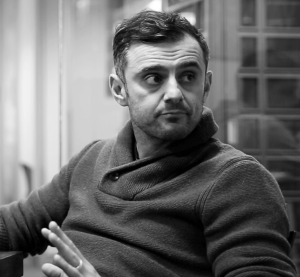
Yes, I said this was one of the 6 things I was most excited about going into ICON, and it did not disappoint. Gary spoke at ICON in 2012 and at that point I had absolutely no idea who he was, but I liked his raw and authentic style. Here we are in 2016 and his style and authenticity are just as palpable, but his message has evolved.
This year’s Gary Vee connected with me in a way that I didn’t expect, and it’s probably at least in part because Gary is 4 years older, wiser, and more experienced. But I believe in large part it’s also because I’m no longer who I was four years ago. My life and corresponding perspective have evolved as well. This was my first year attending ICON as anything other than an Infusionsoft employee. And as much as I pride myself on the empathy I developed and exercised while I was working at Infusionsoft; it has continued to evolve and mature during my 9 months as an entrepreneur since – and I think that contributed greatly to the way I received Gary’s message about small business, adaptation, hustle, and brand.
Fist Bump #3: Logistics
I have to hand it to ICON, and the event staff that coordinated and delivered everything – it really seemed to go pretty smoothly. I checked in on the Tuesday before the conference and they were well staffed, and it was fluid. I remember a year or two ago seeing lines around the corner for people trying to check in, and this year I didn’t feel that. It just seemed smooth.
The expo hall space was also laid out really well. I liked the booth formats, the spacing felt natural, the field in the middle was a nice touch; and they brought in freaking puppies. Puppies that you could adopt! Strong play. Quite the strong play.
Fist Bump #4: Networking
 I don’t think I’m alone in saying that I took more value away from the networking opportunities that ICON provided than the actual content that I consumed. And I don’t mean for that to be a knock on the content – Justin MacDonald’s presentation on Action Planning was amazing, and Greg Hickman’s presentation on R. Kelly was unparalleled. It’s just that the networking was really, really valuable. Every time I turned a corner I was bumping into someone I wanted to talk to. I connected with people who knew me as Monkeypod, former co-workers, partners I had been meaning to reconnect with, and perfect strangers who I was excited to meet. And, this extended beyond just the hallways of the convention center. I’ll be honest, I stepped offsite for a pint once or twice, and I ran into ICON attendees at the bars, restaurants and various other downtown locations.
It was really inspiring to see the connections taking place, knowing that with every conversation that took place, someone’s business was likely growing. Each time I walked through the Sheraton lobby the chairs were filled with entrepreneurs sharing ideas, and picking one another’s brains. Again, it may be unique to me, but I believe there’s something really powerful about being surrounded by that type of energy and those types of people. And kudos to Infusionsoft for creating the environment to support this.
Okay, there, I’ve said my piece. For the 4 of you still reading this, let me just say that overall, ICON was amazing. I took away a ton of ideas, a ton of inspiration, and the momentum that I expect will carry me for the next several months. I hope you did as well. I’d love to hear your biggest take-aways in the comments below. Cheers.
Keap, Software Updates
ICON is always a really exciting week, and in the years past they’ve gone out of their way to announce big changes to the software. Well, this year definitely gave us a glimpse into what we can expect from the software over the next few months, but they really didn’t lay out a long term product road map like I had hoped they would.
First of all, Terry Hicks spoke from stage – and in case you haven’t heard, Terry is the new Chief Product Officer. I like him. I met him at PartnerCon and I was impressed with his “take-action” mentality. His message at PartnerCon was “Don’t take my word for it. Let me show you results.” That’s something I can get behind. But even if I didn’t like him – it’s hard to argue with the traction that they’ve got in the core product lately. Month after month we’ve been seeing powerful new features and updates roll out (albeit, not without a handful of bugs). Check out the January, February and March updates in case you missed them.
Okay, so to learn about the product (which I figured would be important to everyone…) I had to track down the Product Showcase session, which was held in one of the smaller breakout rooms at the same time as 11 other sessions. There were roughly 100 people in the room during the one I attended (they may have held that session more than once, I’m not sure).
The showcase was exactly that, it was a series of product managers sharing the result of whatever they’d been working on. And for someone like me, it was basically a buffet of deliciousness.
Update #1: The New Email Builder is coming to Campaign Builder
When it is coming: Soon. They didn’t commit to a date, but conversations I had led me to believe we’d start seeing it within the next 6 weeks.
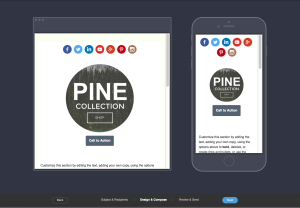
What it does: The new email building environment, which was recently rolled out for broadcasts, will soon be released for the campaign builder.
Why it matters: When they rolled out this new builder I know there was a lot of excitement around it, and many people were disappointed when they realized it was only for the broadcast environment. So, this update will bring that same builder to the rest of the application. This means that you will be able to build uniform and mobile responsive emails across your entire system. Oh yeah, and templates. Did I mention you’ll be able to create and save templates?
Update #2: Physical Credit Card Swipe
When it is coming: TBD or “Soon”
What it does: This is an attachment that you can plug into your mobile device or tablet which will allow you to swipe a credit card, process an order, and trigger automation as a result of a successful payment.
Why it matters: This will be a huge benefit to anyone who does live conferences or events. Now, you’ll be able to create and process orders in real time. No more asking your customer to type in all their information, just swipe the credit card and it pulls the data and runs the payment. They demoed this live during the session and it was pretty slick. You could also add tax or discounts in real time to adjust the order as needed.
Update #3: The New Marketplace
When it is coming: TBD or “Soon”
What it does: This will be a new version of the existing marketplace, but with easier and more intuitive search and navigation.
Why it matters: The current Marketplace is nice, but it can be tough to navigate. Often times you’ll end up searching and you’ll get either 0 search results, or dozens of results. This new marketplace will be easier to operate, and should provide a more customer friendly experience to help you find the tools and solutions you need without the hassle.
Update #4: Infusionsoft Payments are coming to the UK
When is it coming: 3-6 months
What is it: Infusionsoft Payments will be available for customers in the UK.
Why it matters: Infusionsoft Payments is the Merchant Gateway that Infusionsoft announced at ICON last year, and has since been available only in North America (US first, and more recently Canada); but now they’re bringing this payment solution to Infusionsoft Users elsewhere. First up will be the United Kingdom, and I would expect Australia and New Zealand will follow later this year. If you have a merchant gateway that you use and are happy with then this may not be a huge deal for you; but if you’ve had trouble with your gateway, or live in an area where they’re hard to come by, then this could be really big news. I’ve use Infusionsoft Payments since I started Monkeypod and have been thrilled with the experience and the rates.

Update #5: Delight Enhancements
When it is coming: It’s already happening.
What it is: Infusionsoft has recognized that there are some aspects of the platform that just simply aren’t delightful; and recently they’ve been really intentional about addressing these things. My understanding is that we can expect more of this. Infusionsoft wants to make sure that each release that comes out has something in it that customers can see and feel.
Why it matters: This matters because we can all agree that the structure or code base of the software is important, but as a user community it’s also our expectation that this will work as expected without us noticing that it’s being maintained. So, Infusionsoft is making an effort to deploy releases that people can feel and appreciate more easily. This means that hopefully we’ll see more things like the email reporting in the campaign builder, the ability to use internal forms for the quick-add feature, and simple stuff – like being able to clone an order form.
Okay, well, those are the big PRODUCT related announcements from ICON. I wish I had a more specific timeline for when we can expect all of these features to be released; but the reality is that Infusionsoft has been burned in the past by announcing a timeline and being unable to stick to it; so this year their language was unclear about when they’ll be able to deliver these things – and personally, I respect that. They’ll deploy them when they’re ready; and I’ll be thrilled when they do.
If you have questions about any of these, or if you attended a session I missed and want to share something you’re excited about please feel free to comment below! This post was specifically about the Infusionsoft software – you can expect another post in the next week or so recapping the rest of the conference and my favorite sessions and take-aways.

Keap, Small Business
You guys, ICON is nearly here, and this year’s event promises to be better than ever.
In case you’ve never been to ICON, picture this: You show up, and you’re greeted by thousands of small business owners just like you. You’re surrounded by the spirit of entrepreneurship, and the hunger for information. Every single one of the four-thousand attendees is looking for new ways that they can grow their business. And each person is happily sharing the milestones they’ve already hit, and the obstacles they’ve traversed in the process.
I love ICON, not just because of the valuable content delivered by the 80+ speakers, but also because I love the Infusionsoft community – and seeing a large part of this community in the same place at the same time can really be inspiring.
With that being said, here are the 6 things I’m most excited about for ICON 2016:
Partners. Infusionsoft has a partner ecosystem unlike any that I’ve ever seen before. And that ecosystem is on display at ICON like nowhere else. I love browsing the vendor area and meeting the different partners, and seeing demonstrations of what they have to offer. I’m also particularly excited about a handful of partners speaking at breakout sessions this year. If you can, carve out time to see Greg Hickman, Tyler Garns and Brad Martineau.
Networking. I love the content at ICON, don’t get me wrong, but I really love the networking aspect as well. I believe that anytime you get that many entrepreneurs together in the same space you can’t help but have something great happen. I’ve watched some really powerful connections be made over the past few years, and I love seeing the conversations that take place in between sessions, at lunch, or over a pint after-hours. Every single attendee at this conference has at least one-thing in common with you.
Infusionites. Infusionsoft really does have a unique culture, and this culture attracts a specific type of employee. As such, they’ve got some really intelligent and capable people employed inside the Infusionsoft headquarters. I’m really pumped that this year they’ve giving many of those rockstars a platform to share their brilliance. In no particular order, I definitely recommend making time to see Paul Sokol, Justin MacDonald, Brina Kaiser, Jordan Hatch, and Scott Richins.
 Me. I know this one is kinda cheap – listing myself on my own list, but get over it. It’s my list, and I’m pumped. I’m excited about my first opportunity to speak as an Infusionsoft partner. I was fortunate enough to speak at ICON in 2014 and again in 2015, and as I’ve been working on my presentation for the past few weeks, my excitement for this year has been rapidly building. This year I’m presenting 5 productivity tricks that you can use to get more out of your Infusionsoft application. This will be one of the more technical presentations of the week – and I would venture to say that every single person who attends my session will leave having learned at least one new thing (even you Paul Sokol).
Product. It’s the 10th anniversary of ICON. you’ve gotta believe that Infusionsoft has something big up their sleeves for this event. I love hearing Clate Mask speak each year – but this year I’m particularly excited about hearing the new Chief Product Officer, Terry Hicks take the stage. In addition to Terry, Justin Topliff and Tyler Zeman have a session called Product Showcase. ICON is usually where Infusionsoft rolls out their product roadmap, and tells us all the cool stuff they have in store, and personally, I can’t wait.
Gary Freaking Vaynerchuck – are you kidding me? This man is the unofficial small-business spokesperson. He lives and breathes entrepreneurship and delivers his insightful perspectives with a refreshing authenticity that is hard to find. I was lucky enough to hear him speak at ICON in 2012 – and just as my story has continued to evolve since then, I feel confident that his has too.
So that’s my list, and I’m 100% confident that there will be some awesome sessions delivered by people I didn’t mention, or people I hadn’t heard of. For that reason, I’d spend some time pouring over the agenda and highlighting the sessions that you plan to prioritize.
Everyone approaches this conference differently, and that’s perfectly fine. There is tons of value for business owners, employees, partners, or aspiring entrepreneurs. If you’re interested in some technical tricks to get more out of the software, save space for my session on Wednesday at 11 am!
Keap, Software Updates
I don’t know if you had the same relationship I had with NBA Jam, but if you did, you probably remember that if your player made two shots consecutively, you’d hear the announcer say “He’s heating up…” and once they made their third in a row, you’d get the booming “HE’S ON FIRE!”
Then for the next few possessions you’d just chuck up three pointers from wherever you wanted, dunk from half-court, etc. You were basically unstoppable, right?
Anyway, I’m getting off-track.
When the January release came out, and you could easily add and remove people from campaigns, clone order forms, and a few other things – I remember thinking “Hey, this isn’t bad at all.”
Then, when the February Release rolled, and we got inventory management, mobile responsive landing pages and the new email builder, I thought “Man, that’s two in a row, they’re heating up!”
And then boom, here comes today, the March 2016 release rolled and I thought “HE’S ON FIRE!”
This latest release isn’t all that big, it only has a few updates in it, but man, they’re really, really meaningful.
The two updates I’m most excited about are the ability for your customers to make a payment when you send them a quote, and the ability to easily see open rates and click-through percentages on all your campaign emails.
You guys, I’m not crazy. I fully acknowledge that both of these features are pretty standard. And yes, you could make the argument that these features should have been included in the software all along, but guess what – I don’t care. Call me a homer, or an optimist, or whatever. Yup. It sucks that we didn’t have them before, but we have them now. That’s it, let’s move on.
Update #1: Pay a Quote Online and View Status
What it does: It allows you to send a quote to a customer, and allows them to apply a payment once they’ve accepted it.
Why it matters: Infusionsoft introduced the ability to generate quotes a few years back, and people were pretty excited about it. Well, that excitement quelled pretty quickly when we realized that once a customer accepted a quote, it created an order in Infusionsoft but didn’t allow them to make a payment. You had to manually go collect the billing information, and apply the payment yourself. Not very automated, right? So, because of that, quotes were quietly set aside for most users, and never revisited again.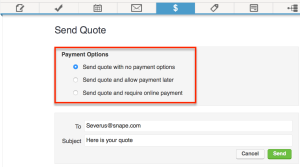
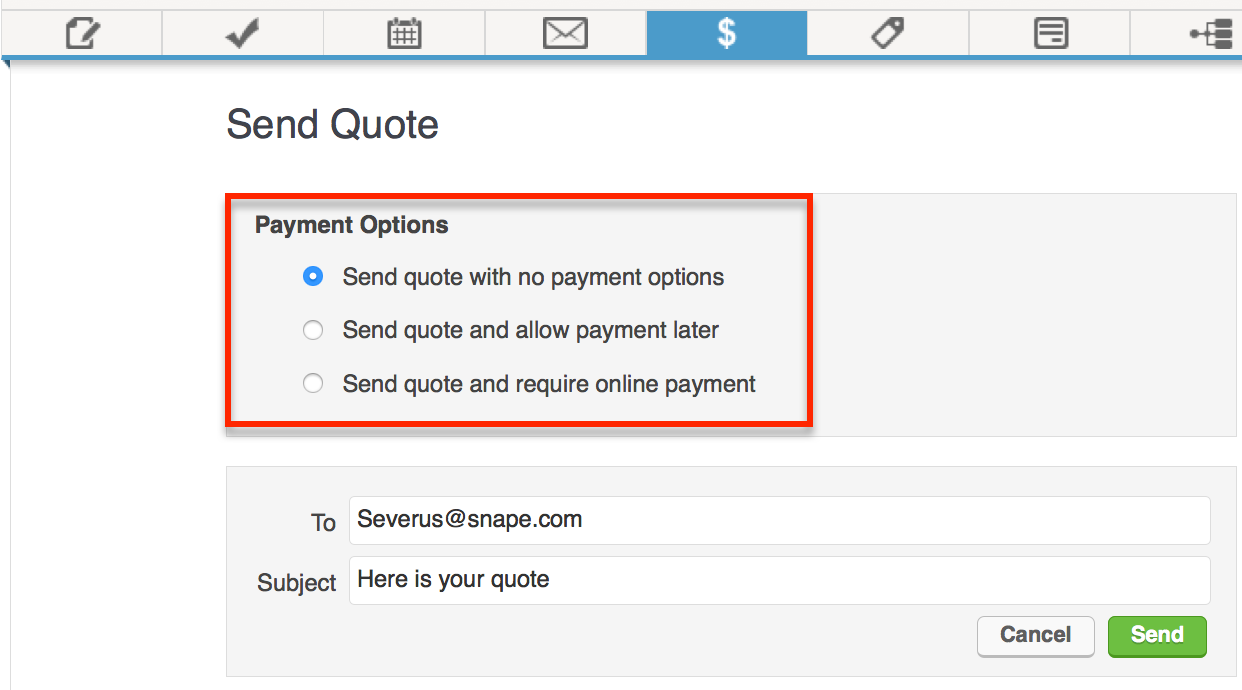
Well, not anymore. Now, when you generate a quote – you’ll also be able to select from three options.
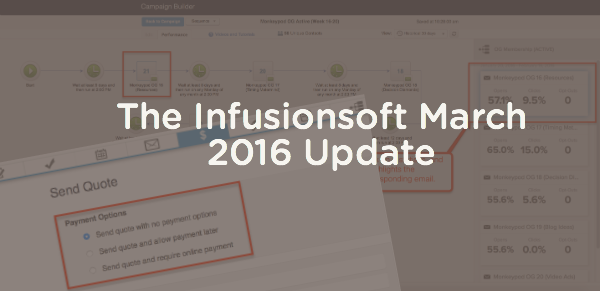
Send quote with no payment options: This means the recipient will be able to accept or decline the quote.
Send quote and allow payment later: This means that the recipient will be able to choose whether they want to pay it then, or defer payment until later.
Send quote and require online payment: This means that the recipient will be required to make a payment online once they’ve accepted the quote.
Yes, once they’ve accepted the quote you’ll get a notification. If they have also paid the quote, you’ll be notified of that as well. You can customize the language in the email that delivers the quote, but the page which they’ll use to make their payment isn’t something you can design (right now). It will have your logo on it though, and in my opinion, it’s pretty sleek looking.
NOTE: An online customer payment of a quote WILL trigger campaigns, purchase actions and billing automation triggers. Say what? I don’t know about you, but to me, that’s amazing.
Update #2: Email Reporting for Campaign Emails
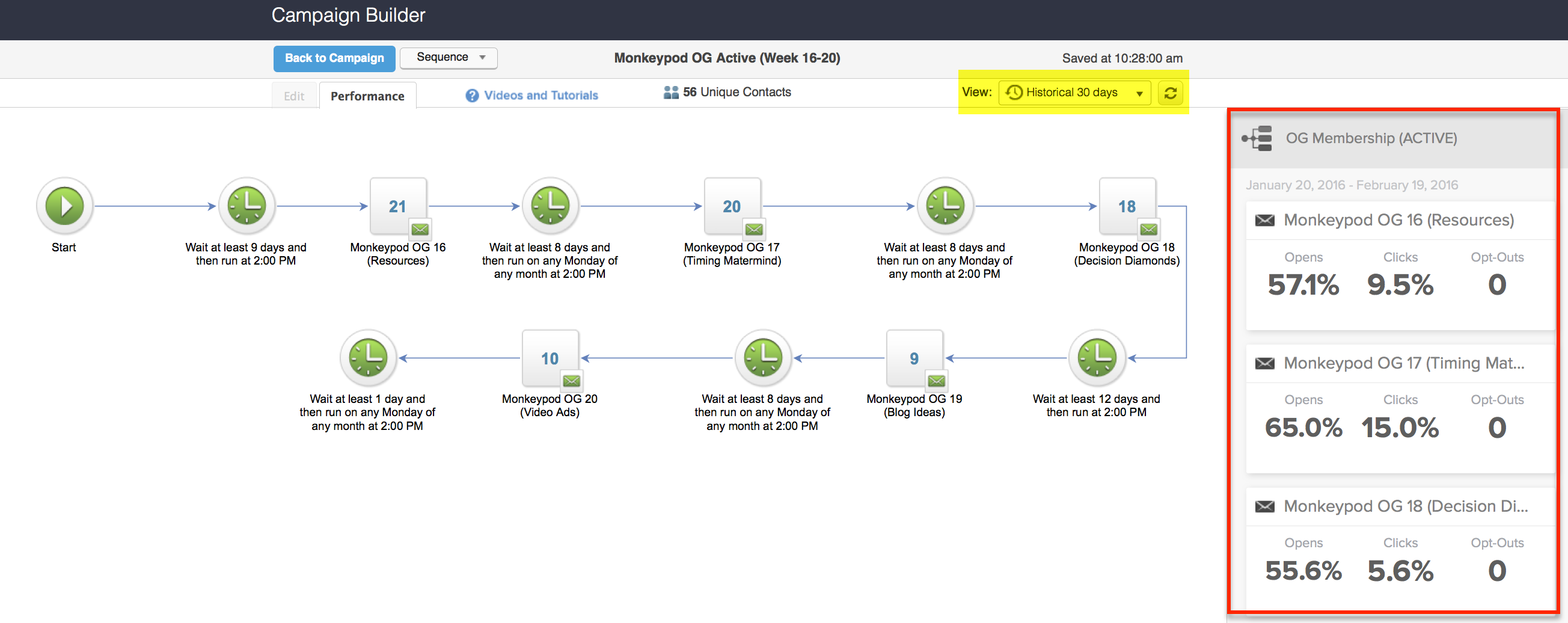
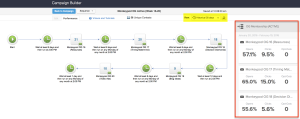
What it does: This allows you to see historical open rates and click-through percentages for your campaign builder emails.
Why it matters: This is HUGE. In the past, if you wanted to see this data you’d have to use some sort of workaround, or export your info and do some excel wizardry. But now, you can easily see email open rates and click-through percentages from the performance tab of the campaign builder. This will empower Infusionsoft users to figure out what is working and what isn’t, so that they can optimize their campaigns and therefore their customer’s experience. Like I said, HUGE.
A few things to note on this one:
To view your email statistics, you’ll have to switch to the performance tab, click into a specific sequence, and then switch to the historical view.
Okay, so that’s about the size of it for this release. Like I said, it’s not a huge release in terms of tons of new features, but it’s a huge release in terms of the direction they’re going, and the momentum they have.
Now, to be fair, I think both of these features still have a few things that need to be added – but just as your marketing campaigns are constantly evolving, so too is the software. In the future, I’d love to see them include the ability to compare emails across sequences, or across campaigns. I’d love to see my highest performing emails (by click % and by open %) for specific time periods, and not just limited to 24 hour or 30 day windows.
With regards to the quoting feature, I’d love to be able to design the interface that the recipient experiences when they’re interacting with the quote, and to me it makes sense to be able to change some of that language. For example, is “quote” always the best term? But, truth be told, I don’t use quotes as heavily in my own business – if you do, I’ve love to hear your opinion.
If you love either of these features, have questions about them, or think I missed something, please go ahead and comment below! Enjoy thanks for reading.