How to Generate 132 Newsletter Ideas

How to Generate 132 Newsletter Ideas

image001I’ve got a guest post here from one of Infusionsoft’s brightest personalities – Judi Miller. You may know her as the voice of Infusionsoft’s training webinars, or just from her numerous contributions to the Infusionsoft ecosystem at large. Suffice to say, Judi has been around the block with Infusionsoft a time or two, and consistently finds ways to go above and beyond to help the customers she works with not only understand the software, but also grow their businesses in ways they didn’t expect. This week I asked her to put on her creative cap and show off how she helps customers who get stuck thinking of topics for their regular newsletter.

And by the end of this article you’ll have 132 new ideas for your newsletter topics. I promise.

Raindrops on roses and whiskers on kittens…

Sound Of MusicCan you name the famous musical that those lyrics are from?

Did you say The Sound Of Music? Ding Ding Ding… You are correct!

Now can you come up with 5 alternate titles?

Make a list of animals that have whiskers.

What marketing strategies would you employ if Sound of Music was being released today?

Those are all examples of brainstorming. It’s great exercise for your brain. And it can be an awesome way to get new, fresh ideas.

TV and movie writers often sit in a room and brainstorm ideas for hours. That’s one of the ways they get their new and exciting episodes and screenplays started. (Here’s one writer describing their techniques)

You too can do this too, and generate new and engaging ideas, and creative ways to provide value to your audience.

So I know you are thinking: “When is she going to get on with Newsletters…”

Well first, I’ve got a hard truth for you. Here ya go…are you ready….
grumpyMost newsletters are BORINGGGGGGGG!!

It’s true. Most of the newsletters that I’ve seen or that I receive are packed with two things: articles and promotions. And sometimes they don’t even tell the reader why those articles matter. Here are the questions you need to be asking yourself:

  • Do my customers and prospects really read my newsletters?
  • Do they enjoy reading them?
  • How would they respond if I just stopped sending them? Would they line up and ask where I went? Would they even notice?
  • Do they look forward to my newsletters each month?
  • Do they open it up and read it? ALL of it?
  • Do I give them ideas, information, make them better, or do anything other than push my product? Do they engage and actually enjoy my monthly voice?

These can be tough questions. And sometimes the answers aren’t fun. So, if your answer is a big fat “No”, or a dull “I dunno”, then I guess that’s it right? There’s nothing you can do at all? Right?

WRONG ANSWER.

If you send a regular newsletter, it can be much more than just a delivery method for information. Each month your newsletter can be encouraging, funny, engaging, inspiring and welcoming. It can create a rich and meaningful relationship between you and your subscribers. I know how corny this sounds, but I’ve seen it!

You can be the source of something they want to share in a mom’s group, a morning huddle at an office, with their friends at happy hour, or out to their social networks. Your newsletter can be something that makes their day. Or their week!

So here’s an idea, if you feel that your newsletters have gone a bit stale, try this:

Create a theme for one month. This is where brainstorming will be helpful. How about something… super! (Maybe, in honor of a new superheros movie. But you can skip the latest Fantastic Four movie, yuk. )

Then, work within that theme. Let’s see, September 2015….Are you SUPER?

(Editor’s note: A common method is one called Starbursting– it’s a method based on asking questions rather than generating answers. Use What, Why, Who, Where, When and How to start questions about your business, using your theme. I.E. Why is our product super? How do we create a super experience? Who do we think is super?)

Now, start to think of how you can use super in all the different parts of your newsletter. Or, for a series of newsletters. Maybe you start out with a definition.
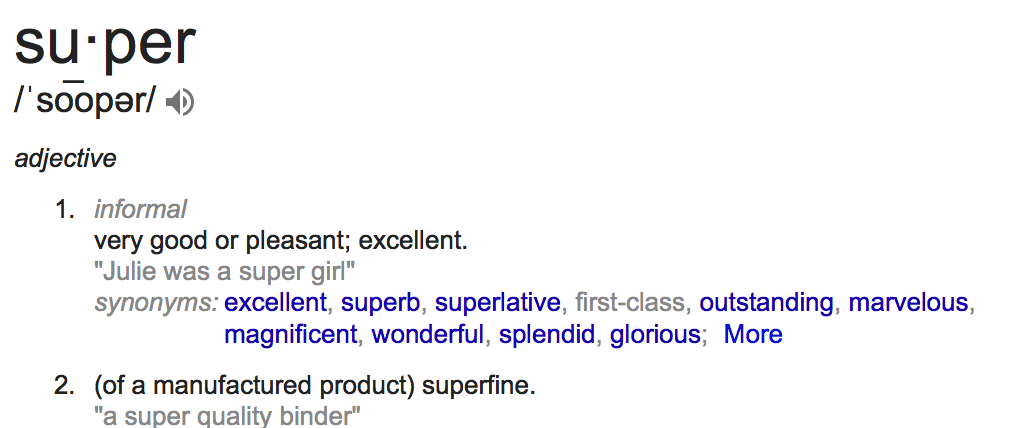
SuperSuper: adj 1. very good or pleasant, excellent

You could… list ten reasons your customers are super. Profile one, or a few of your employees as if they were super heroes.

You can have so much fun with this word. Depending on what industry you’re in, you may be able to come up with creative ways to incorporate your theme.

  • For a family dental office you can have a “Super Flosser Challenge” – and profile a flosser of the month.
  • For a traditional office you can have “Super Service Award” for someone who went above and beyond.
  • You can outline super creative uses for your product – or a collection of super results your customers have shared.
  • If you’re a nutritionist, or diet coach, you could do super foods for your health. Or for your memory. Or for your new and trendy diet.
  • Maybe include a super testimonial from your super customer about a super employee. (Too much super?)

As an entrepreneur, you probably already are accustomed to using the resources around you. Well, if you’ve got a family, why not make it an activity a family can do at the dinner table. Brainstorming is about getting ideas out, and not about judging the ideas. So really, anyone can contribute. And then later, if you want to dismiss some things that’s totally fine. But let’s get it on the list first.

There are tons of brainstorming articles out there, and many different methods, but one common theme is that you can’t stop to judge the ideas as they come.

BreadOnce you settle on a theme for your newsletter, you will find inspiration everywhere. And then, you’ll start to notice your new possible themes too. A bakery delivery truck might make you think ‘fresh’, and that’ll be your new theme.

You could be out running and you’ll think of a theme with customers running from their problems.

Perhaps you’re at a movie theater and it strikes you, your next theme will be “I can’t believe it’s not…” while eating buttered popcorn.

Or maybe an avocado tree will make you think about customer service.

Once your creative juices start flowing, you will not only enjoy writing your monthly newsletter, but your prospects and customers will begin engaging with you more, sharing your newletters more, and your relationships with strengthen. Oh, and higher engagement and stronger relationships are two pretty promising indicators for a uptick in sales too. Sounds supercalifragilicious to me! (Shoot, wrong Julie Andrews movie!)

P.S. To jumpstart your creative process you might start with a list someone else has already put together.

(Editor’s note: 75+24+33=132)

Let us know how you generate newsletter content in the comments below!
The August 2015 Infusionsoft Update

The August 2015 Infusionsoft Update

With another Infusionsoft update being released this week, I thought I’d take a moment to give you my thoughts on the new features.

This update includes a handful of bug fixes, and then two much more noticeable changes.

So, without further ado, the first big change is the process of publishing a campaign. Now, when you click publish there will be a review process that analyzes your campaign and looks for red flags. It’ll show you the checklist, and give you a chance to address things if you’d like before proceeding.  There are some things about this feature that I love (like the ability to add people to this campaign that have previously met the criteria for a new tag goal you’ve added) and a few things I don’t (like not being able to see how many, if any, changes have been made to the campaign).

What it means to you: Well, functionally your campaigns haven’t changed, but this publishing checklist will help you publish more confidently, catch potential errors, and will prompt you to make improvements to your campaigns (like adding merge fields to personalize your emails).

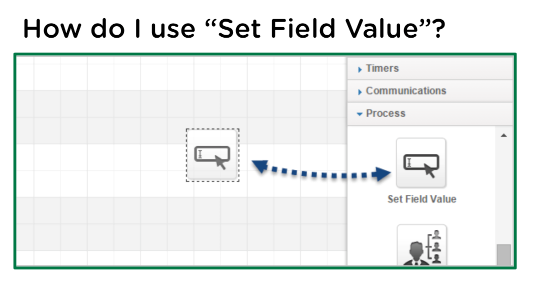
The next feature of note is a super exciting one. In fact, I know a few people who have been reaching for this for years. We now have the ability to set a field to a specific value as a step in a sequence.

It probably has countless use cases, but here’s a video documenting my favorite one:

What it means to you: This means then when someone hits a certain point in a campaign we can automatically update part of their contact record to a certain value. This can impact where they show up on searches and reports, it can also affect what we’re merging into our emails. In addition, it unlocks some ninja strategies that previously were only available with the use of action sets.


So, all in all, another really solid release by Infusionsoft.

Kudos to the teams that worked on getting these out. If they can continue this momentum and keep introducing useful features (and fixes) in small but regular updates I’ll be totally content.

Do you even Live Chat, bro?

Do you even Live Chat, bro?

Lindsay Bayuk, Product, Pure Chat

Lindsay Bayuk, Product, Pure Chat

Lemme tell you a little about my friend Lindsay Bayuk. She does product at PureChat where they empower small businesses to engage website visitors and generate leads with live chat. She was previously the Director of Product at Infusionsoft where she led a team of product managers and product marketers. (PureChat and Infusionsoft are two of my favorite tools.)

And, to add to her ever-growing list of accomplishments, she has now been published on the Monkeypod Blog. I’m seeing chat options popping up on sites all over the place, so, let’s do this.

Improve Website Conversion with Live Chat

Have a website? Of course you do! Do you have an effective website? Uh, maybe?

For many small business owners, your website is core to driving new business. A website is a representation of your company, your accomplishments and more than anything else it should explain why visitors should do business with you.

You’re already investing in your web presence. Social media and blogging drives visitors to your website. You might spend on advertising with Google and Facebook. All of this drives traffic, but what are you doing to ensure that traffic turns into sales? Phone and email are slow and time-consuming, so live chat is the best way to engage those visitors.

purechatLive chat is one of the best ways to engage those visitors. Adding a live chat box to your website empowers your visitors to reach out to you in a non-threatening way. We all use texting and messaging on our phones. Offering live chat provides the same familiar experience for your shoppers (especially for visitors on mobile devices).

In a recent survey by the customer service technology qualification company Software Advice, over 56% of respondents said they had used live chat on a website at least once. One of our customers, Patrick Henshaw of ETI Limousine and Charter in Austin, Texas recently shared, “With texting and social media, people are more comfortable sending messages. Live chat is just another way of texting with businesses.”

Here are four tips to optimize your website with live chat:

  1. Maximize your availability. The more time that you’re available for visitors to engage, the more potential you’ll have for conversations. Not at your desk all day? Make sure you use a live chat software that includes a mobile app. Mobile apps give you the ability to chat with your website visitors even when you’re away from your desk!
  2. Designate the right person. The summer intern may not be the best person to respond to leads on your website. It’s important to have a friendly, knowledgeable team member available to help!
  3. Remove friction. Making live chat available on your website is the first step. To maximize the number of conversations, don’t ask for name, phone and email up front. Gather those details later in the conversation when it’s more natural.
  4. Add at point of purchase. In the survey mentioned above, over 40% of respondents use live chat to answer pricing and purchase questions before they buy. Adding live chat on your shopping cart or checkout page is a great place to improve conversions! Earlier this year, Business Insider reported that consumers left $4 trillion worth of merchandise in their shopping carts. Yikes! Interacting with a person might just help with those final purchase questions.

Here at Pure Chat we’re very excited about helping small businesses capture more leads and convert sales. It’s all about improving the effectiveness of your existing marketing.

How are you optimizing conversion on your website?

We’d love to hear what tips and tricks are working for you!

PS: And, yes, we integrate with Infusionsoft. So, if you’re an Infusionsoft user you can send your live chat leads over to Infusionsoft with tags automatically!

You like tools, eh?

PureChat is one of my favorites, but if you’d like to see the complete list of tools that have earned my trust, check out the Monkeypod Toolbox Ebook:

6 Keys to Crush a Webinar

6 Keys to Crush a Webinar

Webinars are legit. If done properly, they can be a really powerful way to drive engagement and deliver massive value to your audience.

However, there are certainly some things you need to be aware of when you’re running a webinar. The difference between a killer webinar and a flop can be really subtle. I’ll cover 3 of the 6 keys in this post.

As you probably know, I worked at Infusionsoft for a little over three years. Like most Infusionites, I moved around a little bit during that time, but no matter what position I held I was regularly tapped to either run or contribute to webinars. I picked up a few tips along the way, and if you’re going to run webinars for your business, learning these keys will save you some time and help you avoid a few headaches.

Licensed Shark Hunter

Jordan Hatch, Registered Shark Hunter

Also, it’s worth mentioning that a lot of what I learned came directly from the original Infusionsoft Mastermind (and recent licensed shark hunter), Jordan Hatch. The man is an archive of all sorts of knowledge, and webinars are certainly something he’s earned his stripes at.  In fact the keys in this article, and many of the webinars I’ve delivered over the past three years, were inspired heavily by the information Jordan delivered in a mastermind call from 2012 titled “Everything I know about running webinars”. </shout out>

Key Number 1: Do the Training

Webinar_XSbisMost webinar platforms have extensive training programs to familiarize you with their interface. Do the tutorials, and learn the system. Check the system specs and make sure that your equipment will work with the platform you’ve chosen.  The training is important not only because it’s helpful to have a basic understanding, but also because there are probably some features that will make your attendee’s experience much more enjoyable (drawing, captions, questions, surveys, mouse highlights, etc).

Key Number 3: Go Slowly

webinarpost2The slower you talk, the more time you have to react. I don’t know about you, but I personally have a tendency to speed up when I get going, and then periodically I’ll stop and do a temperature check and see how everyone is doing. This does not create a positive attendee experience. Don’t make them tell you to slow down, go slowly, and repeat yourself. Also, during live webinars there’s a good chance there may be some lag, especially when there is movement on the screen(video, screencast, etc), and going slowly reduces the risk of leaving people behind.

Key Number 5: Don’t Try and Do Too Much

webinarpost3Your webinar can feel hectic and overwhelming if you try and cover too much material.  You want your webinar to feel informative, and digestible; not too helter skelter. It’s much better to give them 3 things that your audience can use, than 50 ideas that they cant. People don’t care about information, we care about the results that information creates. Knowing something in a vacuum is much less valuable if we don’t have the capacity to exercise it. Remember, if they love it, you can always do another webinar. But if you cram too much in you’ll dilute the value for the topics you do cover, and you’ll risk pushing people away.

So, that’s half6KeysToCrushingAWebinar of the keys. If this is the type of jam you like, then you can grab the rest of them here. Enjoy.

If you have other tips you’ve learned through running webinars of your own, please feel free to share in the comments below! (I’m talking to you Suzi!)

Blink 182 Loves Marketing Automation

Blink 182 Loves Marketing Automation

Many of you probably remember a song from the late 90’s from punk band Blink 182, titled “All The Small Things”.  But you probably listened to it, bobbed your head a little, and like a number of other punk, rock, and pop rock songs during that era then dismissed it without really digging into its message

Punk Rock

Well, I’m not an expert on pop rock, or music in general, but I know a struggling entrepreneur when I hear one.  My contention is that that song, “All The Small Things”, was really about hard work, the small business spirit, and marketing automation.

“Late night, come home, work sucks, I know.”

How many of us have felt this? You spend way longer than you should have working on a project that maybe isn’t even the best use of your time? I think that this reality is far more prevalent than people are willing to admit.

Okay, so maybe Blink 182 wasn’t really talking to entrepreneurs, but when I hear them sing “All the Small Things”, I can’t help but think about how many small things an entrepreneur spends his or her time doing, when she’d rather be doing something else.

Why did you get into business?

You probably started your business because you’re passionate about what you wanted to do.

running with the bulls

Whether it was teaching yoga, practicing law, helping people plan trips to run with the bulls in Pamplona, or any other number of things – the reality is that in order for you to do the thing you are passionate about, and best at, you also have to do the detail stuff too.

You have to do the books; you have to process orders; you have to hire and fire; you have to collect outstanding receivables, and the list goes on and on

Well, the first step to getting out of that rut and back to focusing on what you are best at, and most passionate about, is introducing automation to take one thing off your plate at a time. Start with all the small things. (see, there’s that song again!)

Here’s one thing that every single business can do to begin automating the small things, and focusing on what they’re best at.

Build an Keap FAQ Campaign with FAQ email templates for the questions you have to answer most commonly.  I think most of us have had this experience:

You receive an email from a prospect with a question about your product, or your pricing, or your event dates. And you realize that this email looks remarkably similar to one you received last week.  So you spend 30-45 seconds searching through your sent folder for the email you already composed, you copy the text from that one, paste it into a reply, spend another 30 seconds proofreading it, editing, and then queue it up and send it out. If you’re really good, you then make a note on that contact in your CRM to log the interaction. Then, pat yourself on the back for feeling clever and pour yourself another mojito.

Does that sound familiar to anyone? Well, sure, that’s probably more efficient than writing out a brand new email from scratch, but with Keap, or whatever your marketing automation platform of choice is, there is a considerably easier way. I challenge you to make a list of the things that occupy your day that aren’t the best use of your time, order it by the things that take up the most time, and seek out ways to introduce automation.

Use the video below to get started with an Keap FAQ Campaign.
And feel free to comment below with any success stories,
or tricks that might help others. Good luck!