




Love what you are seeing?
We have created several courses where we dive more into the technical aspects. So, if you like what you read here, you'll love our courses!!





By:
Greg Jenkins
|
February 9, 2026
|
Technology
If you run regular recurring events, then I think I can make your life a little easier.Here's how most businesses I work with handle repeating live events:
And heck, maybe you've even used campaign merge fields, and campaign links to make your life a little bit easier.But this process is still heavily manual, and a little tiring. Right?Right. So, I think I can make things a little easier for you, and your monthly workshop, or your meet-up every few weeks.Let’s jump right in, shall we?
If you are promoting a live event then you likely want to put the date in the email(s) to your contacts, right? Totally normal request.The way most people handle this problem is to use the campaign merge field. Campaign merge fields are managed centrally on the campaign level, so if you have to make a change, you only need to go to one place to update the date and it will automatically use the new value for every email that was using that merge field.This is especially helpful when you're copying the campaign too, because the campaign merge fields are all copied too, so you can use the same structure and quickly update the merge fields to save yourself time.But even if you update the campaign merge fields, you still have to manually go through and adjust all the date timers for the new event, and for some people this is a dealbreaker.So, I’m going to show you how you can set the campaign and never need to touch it (as far as dates are concerned).
You are advertising on Facebook for your live event. You have 4 events coming up in Jan and Feb.<!-- --><center><iframe src="https://www.youtube.com/embed/NfYlIK7x-7E?rel=0&showinfo=0" width="560" height="315" frameborder="0" allowfullscreen="allowfullscreen"></iframe></center>
For this campaign you're going to need to set up an Event Date custom field (the field should be a Date Type), and then you'll also need one tag, we use "Date Set" as the tag name.
This is how your campaign structure should look:
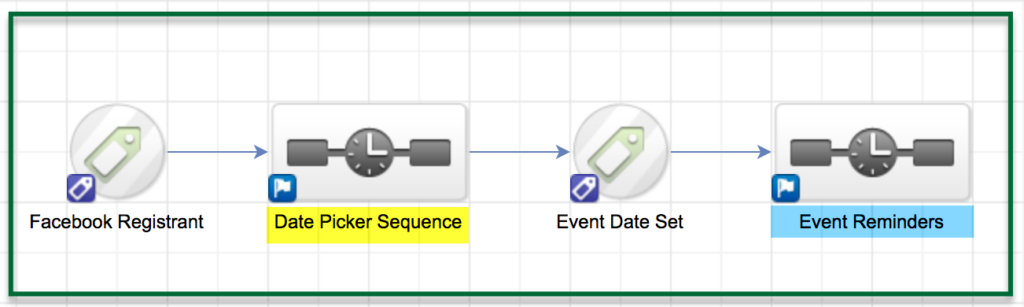
Simple right? The magic happens inside the sequences. Let's take a closer look at what is happening under the hood:
On the second Start element, add a new date timer that runs between the start date of the first event and the day before the next event. Then repeat steps 1-3.Here's how the inside of the Date Picker Sequence (highlighted in yellow above) will look:
Each of the individual "tracks" inside the sequence should look like the image below:
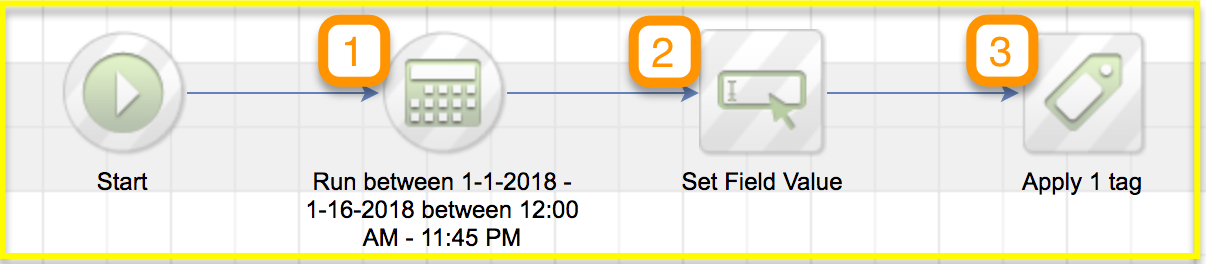
And here are the important things to note about this:
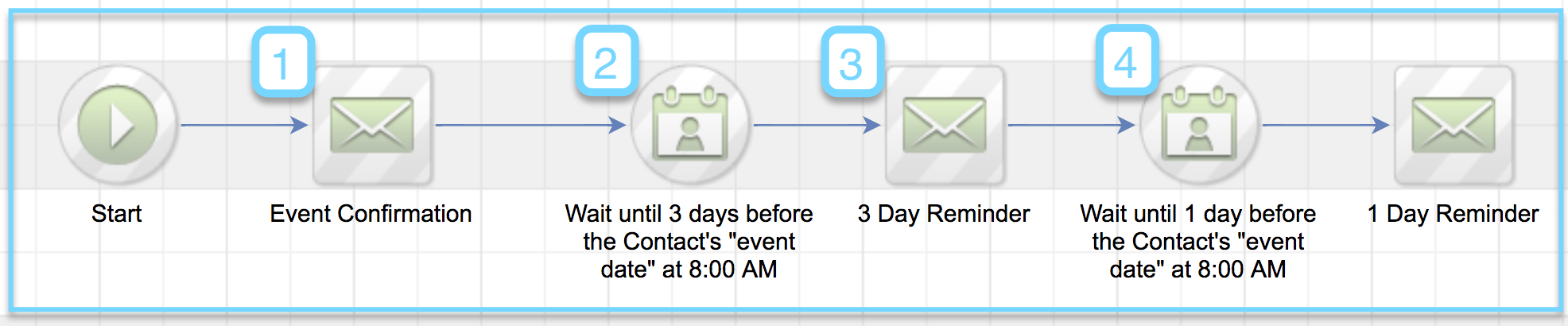
Here's how the inside of the Event Reminders Sequence (highlighted in blue above) will look:
-----------Okay, that's about the size of things. You should now have a functional campaign designed to automatically assign registrants to the next upcoming event, and then send reminders as the event approaches.One benefit of this campaign is that you can set it up for as many events as you have scheduled, so if you know the event dates for the next 6 months, you can build it out, launch, and you shouldn't have to do any real upkeep to make sure things are current.Hope this helps lend some automation to your recurring live events! If you have any questions, please feel free to comment below, or reach out to me directly!
Editor's Note: Kevin's solution is great, but it got me thinking about fringe scenarios where this might not be a good fit, so I recorded a quick video to demonstrate how you can adapt this to allow registrants to sign up ON the day of the event, or to allow them to choose their date of registration, and some automation to address what happens if people sign up after your events have taken place.
Here you can create the content that will be used within the module.
<iframe src="https://www.useloom.com/embed/72c95faf415142a68e02dcc53cf0c9b6" allowfullscreen="allowfullscreen" width="630" height="394" frameborder="0"></iframe>
We have created several courses where we dive more into the technical aspects. So, if you like what you read here, you'll love our courses!!