




Love what you are seeing?
We have created several courses where we dive more into the technical aspects. So, if you like what you read here, you'll love our courses!!





By:
Greg Jenkins
|
February 9, 2026
|
Technology
This post is about integrating Divi and Keap.
Divi is a theme for WordPress websites.
Keap (formerly known as Infusionsoft) is a CRM and marketing automation platform (obvi).
The ability to easily capture leads on your website and reliably add them to your database is paramount; and for Divi users I recently discovered that there is a way to do this without needing any third party tools.
(Update: Apparently I'm a liiiiiittle late to the game and this feature has been available since Sept 2017. Oops.)
First, you select the "Email Optin" Module:
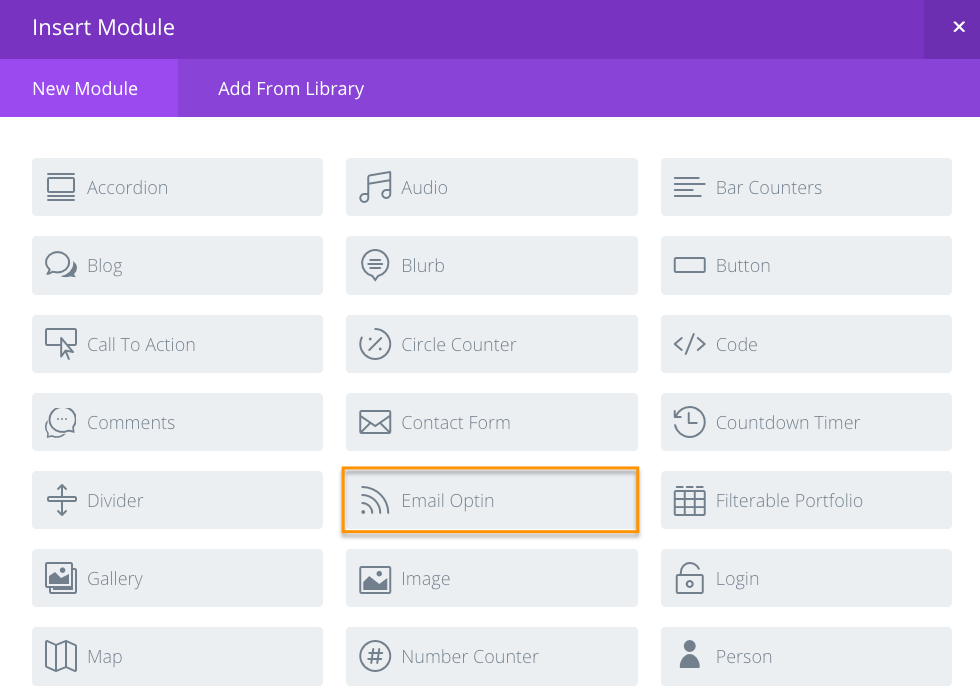
It's worth noting that this opt-in doesn't have much flexibility in terms of what information you collect. Your options are First Name, Last Name, and Email address.
But for simple lead capture this will work just fine.
Edit: So, apparently you can add custom fields to your opt-in forms this way. For some reason this feature appears to only be available using the visual editor; so I didn't notice it at first.
Big thanks to Ben for bringing this to my attention in the comments below!
We have created several courses where we dive more into the technical aspects. So, if you like what you read here, you'll love our courses!!