





Love what you are seeing?
We have created several courses where we dive more into the technical aspects. So, if you like what you read here, you'll love our courses!!





By:
Greg Jenkins
|
February 9, 2026
|
Technology
How to get around this guide:
1) Context
2) Disclaimer
3) What are opportunities?
4) What is a pipleine?
5) What's the benefit?
6) When do I create one?
7) How do I get my team to use it?
8) Multiple pipelines?
9) Can I automate it?
10) What about a campaign?
11) Are they mobile?
12) How about reporting?
What are Keap Opportunities? What is the pipeline? Do I need it? How does it work? What does it do?
I'll be honest - when I first started working with Keap, I didn't know what "opportunities" were. I didn't get it.
It felt abstract, and I didn't see how it tied together with the rest of the platform.
So, even though I was using the software daily, I avoided it...for months.
And I know I'm not the only one.
I don't have a course covering opportunities, I might someday, but for now, consider this Opportunities 101 - for anyone who has ever wondered what they are or where they fit, but has been afraid to ask, or just hasn't taken the time.
I want to be clear - you might not need opportunities at all. If your sales process is entirely online and doesn't involve manual interaction, then this may not be for you at all.
But unless you know what it does, and how it works, you don't know what you're missing out on.
'Opportunities' are records (like contact records), but they represent an interest, rather than a person. In Keap Pro and Max, Opportunities are called "Deals".
Opportunities in Keap are tied to a contact. And contacts can have multiple opportunities, but opportunities can only be attached to a single contact.
Opportunities serve as a vehicle to move someone through a process, most commonly, to track their progression through a series of stages, like a sales pipeline.
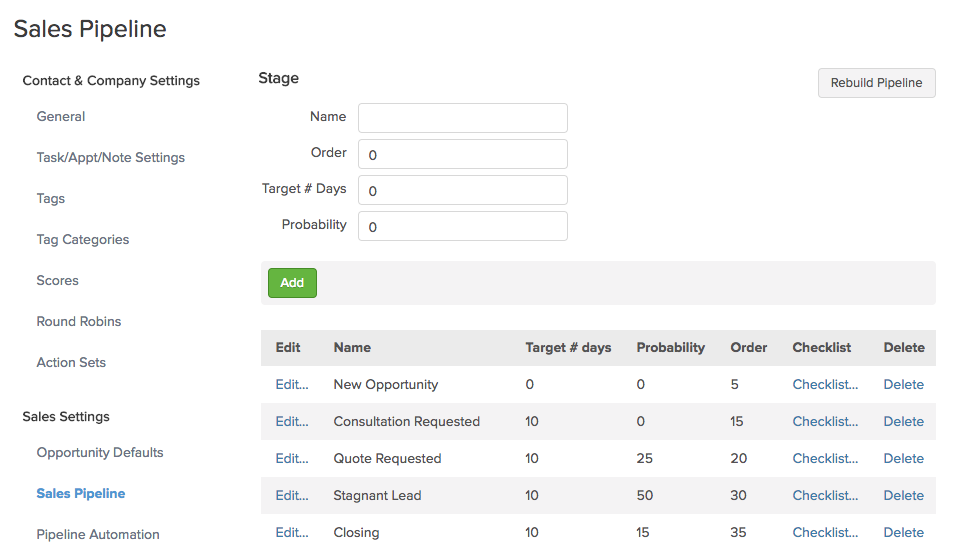
The primary benefit to a business is that it helps you get clear on the process and journey leading up to a purchase - so you can see where your sales are going to come from. As you use it, you can start to gauge "Hey, if they make it to this stage, they have an X% chance of buying."
As you use the pipeline, it can also help you identify bottlenecks, and gives you transparency into your processes. If you know that people are getting stuck in a certain stage for much longer than you'd expect, you can then go investigate why.
Opportunities in Keap also afford you the ability to assign a projected revenue range - which helps you know the total value of the opportunities in your pipeline, or in a specific stage. When you combined this with projected "close" dates and weighted forecasting it unlocks robust reporting and analysis that can be used to inform key decisions.
You can literally help a sales team decide how to allocate their resources, or prioritize their day.
Opportunities help you track your prospects through your sales process without letting any slip through the cracks. And once you've got that - you can also use the stage moves to trigger automation for the repetitive follow up.
If you're going to use Opportunities to track prospects through your sales journey (or any journey) then a natural question is "When do I create an opportunity?
As soon as I get their business card? When the prospect signs up for something? Only after they've asked for a quote?
Here's a good article from Brett Farr over at Blick Digital covering this question, and some ideas for aligning your sales and marketing teams.
The biggest challenge, in my experience, is adoption.
Sometimes sales teams will be resistant to the whole concept because a) they don't want their process, or lack of process, to be exposed, or b) they worry that they'll be replaced, or c) it's technical, or hard, and they see it as one more thing that gets in their way.
So, because of those reasons, it's really important that you own your adoption. Normally this is a sales manager. (I've been in a room with 8 sales reps who I was supposed to train on a $5k pipeline process that was built for them, and 0 of the 8 wanted it. Twas a little awkward.)
The trick is creating an appetite for it. It has to make their life easier. Usually this is by helping them focus their time. And saving them from repetitive shiz, like sending the same "I just left you a voicemail" email over and over.
Here's a good post on sales pipeline adoption.
Normally you'll want to set up your sales stages to be broad or general enough that you can use it to track opportunities of all types, but in some instances, you may find that the sales journey for two of your offerings is quite different. So, in those fringe cases you can set up multiple pipelines using this strategy.
Previously my answer to this was "Moving an opportunity between stages is ALWAYS manual*. Which is by design."
And I'd go on to explain that it's because the pipeline process largely happens offline. Moving someone from one stage to another is a representation of offline interaction, like, having a conversation.
But in 2021 Keap released a feature that allows you to move an opportunity automatically as a step in a sequence - more on that here.
So now you can move an opportunity using automation, or trigger automation when you manually update an opportunity.
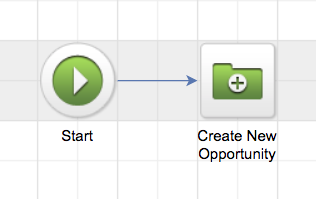
The second one is where Keap really shines - tying this offline interaction to automation. Moving an opportunity between stages and trigger and stop automation (this happens by achieving a campaign builder goal).
So, your sales rep (or whoever) will manually move an opportunity record from one stage to another - but then that manual action can trigger an automated reaction. It's like tipping over the first domino, and then watching what you've built run it's course.
Opportunities will force you, wearer of many hats, to organise, simplify and automatate your sales process - which will make it possible for you to hire someone for that role in the future.
Once you've defined your stages, and you're ready to start layering in automation, you'll want to design a campaign. This article shows you how to build the actual Keap campaign structure which will support the automation between each stage move.
Are you sure you don't have a video training on this, Greg?
I'm sure. But Keap Academy has two courses on using the pipeline features.

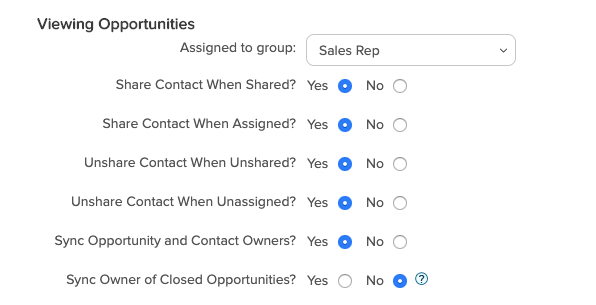
was the owner an opportunity that has already closed, and if those were updated when the contact owner changed then I'd lose that historical record.
Yup.
I get it, maybe your sales reps are on the go. And if they're going to use Opportunities in any meaningful way, they need to be able to access and update the opportunities in their pipeline from their phone, or tablet, palm pilot, or whatever.
The Infusionsoft Mobile app DOES support opportunities. Check out this article for an overview.
Opportunities allow you to track and manage your leads. They also allow you to automate the actions that need to take place in different stages, which keeps your sales process consistent and makes you a better rep.
One of the biggest benefits of using the opportunity pipeline is that it offers you data about your sales process.
You can see where people are in the sales journey, forecast upcoming revenue, as well as highlight bottlenecks or areas where folks may be slipping between the cracks.
There is a pre-built dashboard widget that sales reps can use to manage their personal pipeline, and there is a set of reports specifically to help sales managers keep tabs on how things are going.
We have created several courses where we dive more into the technical aspects. So, if you like what you read here, you'll love our courses!!