




Love what you are seeing?
We have created several courses where we dive more into the technical aspects. So, if you like what you read here, you'll love our courses!!





By:
Greg Jenkins
|
February 9, 2026
|
Technology
If you bring up marketing automation or email marketing with someone, it seems to be just a matter of time until split testing comes up.
And if you use Keap (formerly known as Infusionsoft), you may or may not have noticed that there isn't an easy split testing feature built into the campaign builder.
Well, fortunately some smart people have already solved this with third-party solutions like MyFusionHelper and PlusThis.
Those tools are great, and there are dozens of use cases for either one, but just last week I realized that you could use use Zapier to implement split testing in Keap as well.
I'm sure I'm not the first person to figure this out, in fact there may even be an easier way, but this was the first time I'd stumbled onto this and so I wanted to share in case it helped you out too.
Anyway, without further ado; here are the steps for using Zapier to split test in Keap:
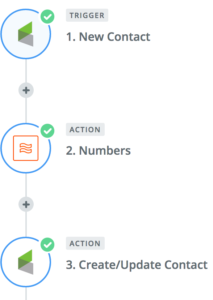
For those of you who are more visual learners, enjoy this short video walking you through the process:
Yes, this isn't a perfect solution, and it may not be as elegant as some of the other options out there - but if you already have a Zapier subscription then this is one way to get a little more bang for your buck. We'd love to hear if you end up using this, or if you have clever ideas to simplify this further.
And if you like stuff like this, then download our Monkeypod Toolbox ebook for the full list of tools we trust:
We have created several courses where we dive more into the technical aspects. So, if you like what you read here, you'll love our courses!!