




Love what you are seeing?
We have created several courses where we dive more into the technical aspects. So, if you like what you read here, you'll love our courses!!





By:
Greg Jenkins
|
February 23, 2026
|
Technology
The more you depend on technology and automation, the more vulnerable you are when things don’t work as planned.
In this post I wanted to cover a few tactics that can help you right the ship when things go sideways.
When you build a campaign you should test it thoroughly, of course.
But even with regular testing from time-to-time you’ll find yourself trying to unravel why things didn’t play out the way your expected, and one of the best pieces of advice I can give for this scenario is to test using clean contact records.
What I mean is that most contacts have a history; a record of the things they’ve done in the past, and what upcoming automations are scheduled for them – but when you’re trying to test a specific part of a specific campaign it can be tricky to pinpoint where things aren’t working if you have other variables in the equation.
So, the advice here is to isolate by create a new contact – one who has never been in your application before, and that way you’ve got a blank slate to work with.
Just remember to periodically clean up dummy contacts you’ve created during testing.
Use an incognito window, or private browsing tab.
This one might sound obvious but I can’t count the number of times I’ve seen this simple trick resolve an otherwise befuddling scenario.
Here’s why: Infusionsoft’s ecommerce components are trying to help simplify things for buyers – it’s trying to make their lives easier by remembering who they are, who their affiliate was, what products they wanted, and what promo codes they’ve used; and most of the time that’s what we want as well.
But, this can create unexpected behavior when we’re testing, updating, adding/removing promotions, and re-testing; so for the sake of your own sanity train yourself and your team to always use private browsing tabs when you’re testing your order forms or shopping cart.
Emails are Infusionsoft’s bread and butter, but one gotcha I regularly see trip people up is that when you use the test function from within the email it sends that test to the user, not to an actual contact.
Did you catch that? The built in test option sends using the details available on the user record, not the details from a contact record.
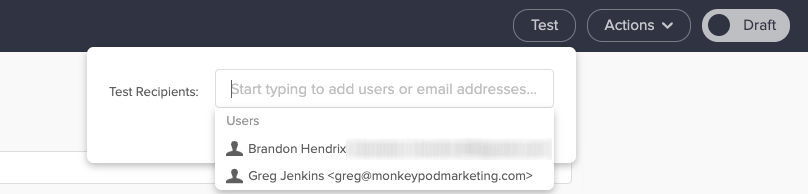
You might be wondering why that matters – and the answer is this: User Records don’t have custom fields.
So, if your email is using any custom field information in the email body (or merged into links) then testing the email to a user will lead you to think it’s not working.
To replicate the experience an actual contact would have you should test your emails by sending to a contact record (use an email other than the one tied to your user record).
I know, you’re smart. I get it. Heck, I like to think I’m pretty clever too.
But assumptions will ruin us when it comes to troubleshooting, because if we assume something is working we’ll skip right over it, and that leads us into sketchy territory because now we’re building off of something we think is true, but might not actually be.
The reason I included this tip was because it’s burned me before, in a big way.
To make a long story short: I tested a campaign and it worked the way I wanted it to – then when I added a bunch of contacts to the campaign it didn’t do what we expected.
I assumed that what worked for individual test contacts would also be true when we loaded the campaign up en masse; and it wasn’t.
This was one of the most painful experience of my automation career – but the lesson was this: Assumptions will ruin us.
Just because it looks good on desktop doesn’t mean it’ll look good on mobile.
Just because it works in gmail doesn’t mean it’ll work in outlook.
Just because it worked for an individual doesn’t mean it’ll work for a group.
Just because it created the outcome you expected doesn’t mean did what you expected.
If you’re troubleshooting something and it’s not making sense, at a certain point you’re probably going to end up liaising with Infusionsoft’s support team.
There are plenty of tips for talking to technical support, heck, I’ve even got two blog posts on it (one annnnd two) – but the most important piece of advice I have is to find yourself a screencapture software you like and get in the habit of using it.
I use and recommend Loom, but another popular option is Soapbox (from the fine folks at Wistia).
Infusionsoft’s support team genuinely wants to help you – but if they can’t replicate an issue then it’s infinitely more challenging.
(Sorta like when you take your car to the mechanic and the noise it was making suddenly stops…)
So, if you know you’re gearing up for a convo with support, do yourself a favor by firing up your screencapture software and recording examples of the behavior you’re seeing (or not seeing).
This is helpful for a few reasons, but primarily because it reduces the opportunity for something to get lost in translation – the longer it takes for the support rep to understand the issue, the more frustration you’re likely to experience. And being able to shortcut that process helps get everyone on the same page more rapidly.
The second benefit is that sometimes by recording the test you’re running it forces you to think differently, or helps you notice something you wouldn’t otherwise have seen; personally I’ve stumbled across more than one solution simply by trying to document the issue.
My sincerest hope is that these tips will save you some headache the next time you find yourself troubleshooting some misbehaving automation.
We have created several courses where we dive more into the technical aspects. So, if you like what you read here, you'll love our courses!!